<?xml version='1.0' encoding='UTF-8'?>
<feed xmlns="http://www.w3.org/2005/Atom" xmlns:media="http://search.yahoo.com/mrss/">
  <id>https://cowboyprogrammer.org/</id>
  <title>Cowboy Programmer</title>
  <updated>2026-02-13T00:21:00+01:00</updated>
  <author>
    <name>Space Cowboy</name>
    <email>jonas@cowboyprogrammer.org</email>
  </author>
  <link rel="self" type="application/atom+xml" href="https://cowboyprogrammer.org/atom.xml" />
  <link rel="alternate" type="text/html" href="https://cowboyprogrammer.org/" />
  <link rel="alternate" type="application/rss&#43;xml" href="https://cowboyprogrammer.org/index.xml" />
  <link rel="alternate" type="application/json" href="https://cowboyprogrammer.org/feed.json" />
  <generator>Hugo -- gohugo.io</generator>
  <subtitle>Recent content in Cowboy Programmer on Cowboy Programmer</subtitle>
  <icon>https://cowboyprogrammer.org/css/images/logo.png</icon>


  <entry>
    <id>https://cowboyprogrammer.org/2026/02/chargeamps-avoid/</id>
    <link href="https://cowboyprogrammer.org/2026/02/chargeamps-avoid/" rel="alternate" />
    <title>I&#39;m Removing My ChargeAmps Halo: A Critical Review</title>
    <updated>2026-02-13T00:21:00+01:00</updated>
    <author>
      <name>Space Cowboy</name>
      <email>jonas@cowboyprogrammer.org</email>
    </author>
    
    <media:thumbnail url="https://cowboyprogrammer.org/images/2026/02/charger-power-rollercoaster.png" />
    
    <summary type="html"><![CDATA[If you are looking to install an EV charger at home, or if you are considering the ChargeAmps Halo, read this review first.
I recently bought a house that came equipped with a ChargeAmps Halo charger and an Enegic (now Perific) current load balancer. On paper, it sounded like a decent setup. In reality, it has been a masterclass in how not to design smart home hardware.
After months of frustration, support calls, and failed attempts to get basic functionality working reliably, I have decided to pay an electrician to rip the entire system out.]]></summary>
    <content type="html"><![CDATA[

<p>If you are looking to install an EV charger at home, or if you are considering the <strong>ChargeAmps Halo</strong>, read this review first.</p>

<p>I recently bought a house that came equipped with a <strong>ChargeAmps Halo</strong> charger and an <strong>Enegic (now Perific)</strong> current load balancer. On paper, it sounded like a decent setup. In reality, it has been a masterclass in how <em>not</em> to design smart home hardware.</p>

<p>After months of frustration, support calls, and failed attempts to get basic functionality working reliably, I have decided to pay an electrician to rip the entire system out. Here is why you should probably avoid ChargeAmps.</p>

<h2 id="chargeamps-halo-cloud-dependency-for-basic-safety">ChargeAmps Halo Cloud Dependency for Basic Safety</h2>

<p>The fragility of this system became apparent on my very first night in the house. I plugged in the car, expecting the 11kW capabilities that the charger claims and that my car can accept. Instead, I was getting a meager 5.2kW (approx 6-8A).</p>

<p>After phoning support, I learned the absurd truth: <strong>The ChargeAmps Halo defaults to a safety mode of 6A if it doesn&rsquo;t have an active connection to the cloud.</strong></p>

<p>This revealed a critical flaw in the architecture: <strong>total dependence on WiFi and the Cloud.</strong></p>

<p>The same sad fact is true of the Enegic load balancer which measures the house consumption, but it doesn&rsquo;t talk to the charger directly via a local network or cable. Instead:
1. It sends data to the internet (Cloud).
2. ChargeAmps cloud processes it.
3. The cloud sends a command back down to the Halo charger to adjust the current.</p>

<p>To even get the system to attempt a full charge, I had to relocate one of my WiFi access points specifically to provide coverage to the garage—a placement that worsened availability inside the house.</p>

<h2 id="the-partner-ecosystem-problem">The &ldquo;Partner&rdquo; Ecosystem Problem</h2>

<p>With the WiFi infrastructure finally in place, the next hurdle was administrative. Managing these devices requires phoning support—not just once, but multiple times. I had to contact both Enegic and ChargeAmps just to get accounts set up so I could even see my own hardware and enable them to communicate with each other.</p>

<p>But &ldquo;seeing&rdquo; is about all you can do. ChargeAmps has a philosophy where &ldquo;admin&rdquo; access is restricted to &ldquo;partners&rdquo; (i.e., the installation electricians). As an end-user and the owner of the hardware, you are treated as a guest system. You can only change parameters within the partner-defined boundaries.</p>

<p>This became a critical issue because I bought the house with the charger already installed. I don&rsquo;t <em>have</em> a partner. I am just a guy with a charger I ostensibly own but cannot fully control.</p>

<p>Even getting basic data out of the device required begging. I had to contact support yet again just to obtain an API key, solely so I could visualize the charger stats in Home Assistant. It felt less like owning hardware and more like requesting permission to view my own usage data.</p>

<h2 id="the-enegic-load-balancer-that-couldn-t-balance">The Enegic Load Balancer That Couldn&rsquo;t Balance</h2>

<p>Once I had the WiFi fixed and the accounts linked, I expected smooth sailing. I drive over 100km a day and in the Swedish winter, I need to charge about 30kWh overnight to be ready for the next day.</p>

<p>Instead, I often woke up to a car that wasn&rsquo;t fully charged. The culprit was the load balancer logic.</p>

<p>The load balancer was reacting to power spikes caused by the house heating system. Instead of gracefully lowering the current, it would frequently panic and stop the charging session entirely.</p>

<p>Thinking I had a capacity problem, I paid an electrician to upgrade my main breaker from 20A to 25A. All other things being equal, this gave me 5A of additional headroom. Since the minimum charging current is usually 6A, having 5A of pure buffer should have made it nearly impossible for the system to need to pause the charge.</p>

<p>After the upgrade, I logged into the Perific/Enegic interface and updated the settings to reflect the new 25A capacity. It made absolutely no difference. See the following graph for the power usage of the charger. At first glance the power seems good because the spikes are close to 10kW but the constant drops means the charger pauses all the time which drops the mean power to around 2kW.</p>

<p><img src="/images/2026/02/charger-power-rollercoaster.png" alt="Graph showing inconsistent power delivery from ChargeAmps Halo due to flawed load balancing" /></p>

<p>I once again awoke to a pathetic 63% charge level. In frustration, I even tried configuring it with an absurd 250A capacity, hoping to force the algorithm to &ldquo;max out.&rdquo; The result? It throttled down to 2kW. I cannot explain it, and neither could the manual. The logic is simply fundamentally broken; it refused to utilize the clear overhead I had purchased. See the following graph of the maximum current used on any phase during the morning when no car is charging. The spikes in the graph are the electric radiators pulsing on and off to in response to their thermostats (set at 19C). The graphs shows very short spikes to 14A - meaning there should be a full 11A safely available at all times!</p>

<p><img src="/images/2026/02/house-current.png" alt="Graph of house current usage showing available capacity for EV charging" /></p>

<h3 id="the-6a-limbo">The 6A Limbo</h3>

<p>So, the load balancer was useless. I decided to bypass it entirely. My plan was to run the charger at a constant current and handle any necessary limiting via the car settings or Home Assistant.</p>

<p>I contacted ChargeAmps support (yet again) and managed to convince an agent to set my &ldquo;offline current&rdquo; to 16A (max). This theoretically allows the charger to deliver full power even if I physically disconnected the load balancer.</p>

<p>In practice? <strong>No change.</strong></p>

<p>Despite the support agent&rsquo;s efforts, the hardware logic seems to override this setting. Whenever the load balancer isn&rsquo;t dictating terms, the charger defaults back to its &ldquo;safety mode&rdquo; of 6A.</p>

<p>If your internet goes down? <strong>6A.</strong>
If their server has a hiccup? <strong>6A.</strong>
If you disconnect the malfunctioning load balancer? <strong>6A.</strong></p>

<p>For now, I am forced to live with this. 6A on three phases at 400V is around 4.1kW, meaning I can recharge my daily usage in about 7 hours. It is absolutely ridiculous to be throttled like this on an 11kW capable charger, but I can still get to work and back.</p>

<h2 id="the-ocpp-mirage-on-chargeamps">The OCPP Mirage on ChargeAmps</h2>

<p>&ldquo;But wait,&rdquo; I thought, &ldquo;The spec sheet says it supports <strong>OCPP 1.6J</strong>.&rdquo;</p>

<p>Open Charge Point Protocol (OCPP) is the standard that allows chargers to talk to any management system. Theoretically, I should be able to disconnect it from the ChargeAmps proprietary cloud and connect it to Home Assistant or a local OCPP server to handle the logic myself.</p>

<p>Determined to make this work, I tested against three different OCPP implementations:
1. <strong><a href="https://github.com/lbbrhzn/ocpp">lbbrhzn/ocpp</a>:</strong> The charger indicated it was ready, initiated a transaction, but then immediately went into a <code>SuspendedEVSE</code> state and never actually started flowing current. Remote start commands were ignored.
2. <strong><a href="https://github.com/steve-community/steve">SteVe</a>:</strong> The exact same behavior. Handshake, transaction start, then suspension. No charging.
3. <strong><a href="https://powerfill.app/">Powerfill.app</a>:</strong> This cloud-based option couldn&rsquo;t even establish a connection, possibly due to SSL implementation issues on the charger side.</p>

<p>The verdict? The charger connects and handshakes, but <strong>refuses to charge.</strong></p>

<p>Despite the marketing claims, the OCPP implementation seems non-functional.</p>

<h2 id="conclusion-tear-it-out">Conclusion: Tear It Out</h2>

<p>I accept the principle that certified electricians should handle high-voltage installations. However, I do <strong>not</strong> accept being locked out of the software configuration for hardware I legally own.</p>

<p>Consider my breaker box. I am not allowed to rewire it myself, but that does <strong>not</strong> mean there is a manufacturer&rsquo;s padlock on it preventing me from resetting a fuse. What happens if my preferred electrician isn&rsquo;t a &ldquo;ChargeAmps Partner&rdquo;? I am effectively held hostage by their partner network.</p>

<p>I am done fighting with it. I am hiring an electrician to remove this &ldquo;smart&rdquo; e-waste. I plan to replace it with a charger that has smart features as an optional extra, and where WiFi is not a requirement for basic functionality.</p>

<p>If you value reliability and control, pick a charger that supports local networking and open protocols natively, and <strong>Avoid ChargeAmps</strong>.</p>
]]></content>
  </entry>
  
  <entry>
    <id>https://cowboyprogrammer.org/2025/01/gnucash-csv-import-tips/</id>
    <link href="https://cowboyprogrammer.org/2025/01/gnucash-csv-import-tips/" rel="alternate" />
    <title>Tips for importing CSVs in GnuCash</title>
    <updated>2025-01-15T00:00:00+00:00</updated>
    <author>
      <name>Space Cowboy</name>
      <email>jonas@cowboyprogrammer.org</email>
    </author>
    
    <summary type="html"><![CDATA[Condensing some information so that others can benefit from my experience with importing CSVs into GnuCash.
Having several banks means some difficulty in getting a proper overview of your finances. Hence, I use GnuCash to import all transactions and get a good overview of my finances.
Getting the data into GnuCash is quite tedious though. Banks don&rsquo;t typically provide API access. So every once in a while, I log on to each bank, one by one, and download exported transactions.]]></summary>
    <content type="html"><![CDATA[

<p>Condensing some information so that others can benefit from my experience with importing CSVs into GnuCash.</p>

<p>Having several banks means some difficulty in getting a proper overview of your finances. Hence, I use GnuCash to import all transactions and get a good overview of my finances.</p>

<p>Getting the data into GnuCash is quite tedious though. Banks don&rsquo;t typically provide API access. So every once in a while, I log on to each bank, one by one, and download
exported transactions. Sometimes, these are provided as CSVs. Sometimes, they are provided as Excel (<code>.xlsx</code>) files. Sometimes, the UI will say it&rsquo;s an Excel file but what
you end up downloading is a CSV file.</p>

<p>No matter. Pandas can handle both. Pandas is awesome. You should use it. But I digress.</p>

<h2 id="recommendations">Recommendations</h2>

<ol>
<li>Pre-format your data. Do not take your CSV straight from your bank to GnuCash. Massage the data a bit first.</li>
<li>When possible, use multi-split CSV files. This will save you a lot of time and swearing instead of relying on GnuCash&rsquo;s bayesian matching algorithm.</li>
<li>Generate as few CSV files as possible for import into GnuCash. Also a time saver.</li>
</ol>

<h2 id="pre-formatting">Pre-formatting</h2>

<p>You should generate two files, one for single transactions, one for multi-split transactions.</p>

<p>Single transactions specify a single account for the transaction, while multi-split transactions specify multiple accounts associated with the transaction.</p>

<p>GnuCash requires the entire file to be multi-split or not multi-split. You can&rsquo;t mix and match in a single file.</p>

<h3 id="single-transactions">Single transactions</h3>

<p>You want to format your data so that it corresponds to how GnuCash wants it. These are the minimum columns that you&rsquo;ll want to have in your CSV:</p>

<ul>
<li>Account, the account name in GnuCash to import the transaction into</li>
<li>Date, in yyyy-mm-dd format</li>
<li>Description, the text that describes the transaction</li>
<li>Amount, the amount of the transaction</li>
</ul>

<p>These columns will let you smoothly import transactions into GnuCash.</p>

<h3 id="multi-split-transactions">Multi-split transactions</h3>

<p>Use these columns to import multi-split transactions:</p>

<ul>
<li>TransactionId, a unique identifier for the transaction</li>
<li>Account, the account name in GnuCash to import the transaction into</li>
<li>Date, in yyyy-mm-dd format</li>
<li>Description, the text that describes the transaction</li>
<li>Amount, the amount of the transaction</li>
<li>Value, the amount of the transaction in the original currency (I&rsquo;ll explain why this is important later)</li>
<li>Commodity/Currency, the currency or commodity of the transaction</li>
<li>Price/Rate, the exchange rate used for the transaction</li>
</ul>

<h2 id="why-use-multi-split-transactions">Why use multi-split transactions?</h2>

<p>Several reasons:</p>

<ul>
<li>A certain description is always a certain kind of Expense</li>
<li>You are transferring money between your own accounts, like between Savings accounts</li>
<li>You are buying/selling stocks</li>
<li>Your are convering between currencies are part of the transaction</li>
</ul>

<p>It all boils down to: you know where the money came from and where it is going. Let&rsquo;s just get that into the CSV.</p>

<h3 id="use-transactionids-to-match-multi-split-transactions">Use transactionIds to match multi-split transactions</h3>

<p>Multi-split transactions are just several transactions listed in the same file. GnuCash will group these transactions based on them having the same <code>TransactionId</code>.</p>

<p>So related transactions must share the same <code>TransactionId</code>.</p>

<p>The simplest case if for two transactions to be related. One is the debit, one is the credit.</p>

<p>But it is easy to extend this to more. Consider a mortgage payment. Three transactions will be involved:</p>

<ul>
<li>TX1: Money leaving your bank account</li>
<li>TX2: Paying the interest</li>
<li>TX3: Paying down the principal</li>
</ul>

<p>All three transactions will have the same <code>TransactionId</code>. The Values (not necessarily amounts) will also sum to zero.</p>

<h3 id="what-is-value-and-what-is-amount">What is Value and what is Amount?</h3>

<p>We have to consider a currency exchange for this to make sense.</p>

<ul>
<li>TX1: 100 USD leaves account A</li>
<li>TX2: 90 EUR arrives in account B</li>
</ul>

<p>In this case the transactions will look like this:</p>

<table>
    <thead>
        <tr>
            <th>TransactionId</th>
            <th>Account</th>
            <th>Amount</th>
            <th>Value</th>
            <th>Commodity</th>
            <th>Price</th>
        </tr>
    </thead>
    <tbody>
        <tr>
            <td>123</td>
            <td>Assets:AccountA</td>
            <td>-100</td>
            <td>-100</td>
            <td>CURRENCY:USD</td>
            <td>1</td>
        </tr>
        <tr>
            <td>123</td>
            <td>Assets:AccountB</td>
            <td>90</td>
            <td>100</td>
            <td>CURRENCY:EUR</td>
            <td>100/90</td>
        </tr>
    </tbody>
</table>

<p>What tripped me up was that the price is always expressed as the source currency divided by the destination currency. Which seems opposite to me&hellip;</p>

<p>The <code>Amount</code> is the amount in the account currency. The <code>Value</code> is the amount in the &ldquo;source&rdquo; currency.</p>

<p>So as you can see, <code>Amount</code> doesn&rsquo;t necessarily sum to zero, but <code>Value</code> should always do so.</p>

<h2 id="show-me-some-code">Show me some code</h2>

<p>I keep it simple, and work with Dicts. Because Pandas can handle lists of dicts to generate a dataframe which it can then write to a CSV.</p>

<p>Given you&rsquo;ve parsed your raw CSV, you can create a transaction with:</p>
<div class="highlight"><pre style="background-color:#f0f0f0;-moz-tab-size:4;-o-tab-size:4;tab-size:4"><code class="language-python" data-lang="python"><span style="color:#007020;font-weight:bold">def</span> <span style="color:#06287e">make_single_transaction</span>(
    transaction_id: <span style="color:#007020">str</span>,
    account: <span style="color:#007020">str</span>,
    date: <span style="color:#007020">str</span>,
    description: <span style="color:#007020">str</span>,
    amount: <span style="color:#007020">float</span>,
    commodity: <span style="color:#007020">str</span> <span style="color:#666">|</span> None <span style="color:#666">=</span> None,
    balance: <span style="color:#007020">float</span> <span style="color:#666">|</span> None <span style="color:#666">=</span> None,
    <span style="color:#666">**</span>kwargs,
) <span style="color:#666">-&gt;</span> <span style="color:#007020">dict</span>[<span style="color:#007020">str</span>, <span style="color:#007020">str</span> <span style="color:#666">|</span> <span style="color:#007020">float</span> <span style="color:#666">|</span> None]:
    <span style="color:#007020;font-weight:bold">return</span> {
        <span style="color:#4070a0">&#34;TransactionId&#34;</span>: transaction_id,
        <span style="color:#4070a0">&#34;Account&#34;</span>: account,
        <span style="color:#4070a0">&#34;Date&#34;</span>: date,
        <span style="color:#4070a0">&#34;Description&#34;</span>: description,
        <span style="color:#4070a0">&#34;Amount&#34;</span>: amount,
        <span style="color:#4070a0">&#34;Value&#34;</span>: amount,
        <span style="color:#4070a0">&#34;Commodity/Currency&#34;</span>: commodity,
        <span style="color:#4070a0">&#34;Price/Rate&#34;</span>: <span style="color:#40a070">1</span>,
        <span style="color:#4070a0">&#34;Balance&#34;</span>: balance,
        <span style="color:#666">**</span>kwargs,
    }</code></pre></div>
<p>Similarly for multi-split transactions, not much different:</p>
<div class="highlight"><pre style="background-color:#f0f0f0;-moz-tab-size:4;-o-tab-size:4;tab-size:4"><code class="language-python" data-lang="python"><span style="color:#007020;font-weight:bold">def</span> <span style="color:#06287e">make_multisplit_transaction</span>(
    transaction_id: <span style="color:#007020">str</span>,
    account: <span style="color:#007020">str</span>,
    date: <span style="color:#007020">str</span>,
    description: <span style="color:#007020">str</span>,
    amount: <span style="color:#007020">float</span>,
    value: <span style="color:#007020">float</span>,
    commodity: <span style="color:#007020">str</span> <span style="color:#666">|</span> None,
    price: <span style="color:#007020">float</span> <span style="color:#666">|</span> None <span style="color:#666">=</span> None,
    balance: <span style="color:#007020">float</span> <span style="color:#666">|</span> None <span style="color:#666">=</span> None,
) <span style="color:#666">-&gt;</span> <span style="color:#007020">dict</span>[<span style="color:#007020">str</span>, <span style="color:#007020">str</span> <span style="color:#666">|</span> <span style="color:#007020">float</span> <span style="color:#666">|</span> None]:
    price <span style="color:#666">=</span> price <span style="color:#007020;font-weight:bold">if</span> price <span style="color:#007020;font-weight:bold">is</span> <span style="color:#007020;font-weight:bold">not</span> None <span style="color:#007020;font-weight:bold">else</span> <span style="color:#40a070">1</span>

    <span style="color:#007020;font-weight:bold">return</span> {
        <span style="color:#4070a0">&#34;TransactionId&#34;</span>: transaction_id,
        <span style="color:#4070a0">&#34;Account&#34;</span>: account,
        <span style="color:#4070a0">&#34;Date&#34;</span>: date,
        <span style="color:#4070a0">&#34;Description&#34;</span>: description,
        <span style="color:#4070a0">&#34;Amount&#34;</span>: amount,
        <span style="color:#4070a0">&#34;Value&#34;</span>: value,
        <span style="color:#4070a0">&#34;Commodity/Currency&#34;</span>: commodity,
        <span style="color:#4070a0">&#34;Price/Rate&#34;</span>: <span style="color:#40a070">1</span> <span style="color:#007020;font-weight:bold">if</span> price <span style="color:#007020;font-weight:bold">is</span> None <span style="color:#007020;font-weight:bold">else</span> price,
        <span style="color:#4070a0">&#34;Balance&#34;</span>: balance,
    }</code></pre></div>
<p>You can generate a transaction ID by combining the account name and all columns in your raw CSV row to get a reasonably unique identifier.
I like to generate UUIDs from this because it looks nicer.</p>
<div class="highlight"><pre style="background-color:#f0f0f0;-moz-tab-size:4;-o-tab-size:4;tab-size:4"><code class="language-python" data-lang="python"><span style="color:#007020;font-weight:bold">import</span> <span style="color:#0e84b5;font-weight:bold">uuid</span>

transaction_id <span style="color:#666">=</span> uuid<span style="color:#666">.</span>uuid5(uuid<span style="color:#666">.</span>NAMESPACE_DNS, f<span style="color:#4070a0">&#34;{account}{date}{description}{amount}&#34;</span>)</code></pre></div>
<p>If you have more columns which makes the row more unique, stick em in there. If you have a balance column, that should hopefully change for each transaction.</p>

<p>Now if you have a transaction, and you know where the money is going, you can use this function to generate a matching transaction:</p>
<div class="highlight"><pre style="background-color:#f0f0f0;-moz-tab-size:4;-o-tab-size:4;tab-size:4"><code class="language-python" data-lang="python"><span style="color:#007020;font-weight:bold">def</span> <span style="color:#06287e">make_matching_transaction</span>(
    transaction: <span style="color:#007020">dict</span>[<span style="color:#007020">str</span>, <span style="color:#007020">str</span> <span style="color:#666">|</span> <span style="color:#007020">float</span> <span style="color:#666">|</span> None],
    transfer_account: <span style="color:#007020">str</span>,
    amount: <span style="color:#007020">float</span> <span style="color:#666">|</span> None <span style="color:#666">=</span> None,
) <span style="color:#666">-&gt;</span> <span style="color:#007020">dict</span>[<span style="color:#007020">str</span>, <span style="color:#007020">str</span> <span style="color:#666">|</span> <span style="color:#007020">float</span> <span style="color:#666">|</span> None]:
    <span style="color:#007020;font-weight:bold">return</span> make_multisplit_transaction(
        transaction_id<span style="color:#666">=</span>transaction[<span style="color:#4070a0">&#34;TransactionId&#34;</span>],
        account<span style="color:#666">=</span>transfer_account,
        date<span style="color:#666">=</span>transaction[<span style="color:#4070a0">&#34;Date&#34;</span>],
        description<span style="color:#666">=</span>transaction[<span style="color:#4070a0">&#34;Description&#34;</span>],
        amount<span style="color:#666">=</span> amount <span style="color:#007020;font-weight:bold">if</span> amount <span style="color:#007020;font-weight:bold">is</span> <span style="color:#007020;font-weight:bold">not</span> None <span style="color:#007020;font-weight:bold">else</span> <span style="color:#666">-</span>transaction[<span style="color:#4070a0">&#34;Amount&#34;</span>],
        value<span style="color:#666">=</span>amount <span style="color:#007020;font-weight:bold">if</span> amount <span style="color:#007020;font-weight:bold">is</span> <span style="color:#007020;font-weight:bold">not</span> None <span style="color:#007020;font-weight:bold">else</span> <span style="color:#666">-</span>transaction[<span style="color:#4070a0">&#34;Value&#34;</span>],
        commodity<span style="color:#666">=</span>transaction[<span style="color:#4070a0">&#34;Commodity/Currency&#34;</span>],
        price<span style="color:#666">=</span>transaction[<span style="color:#4070a0">&#34;Price/Rate&#34;</span>],
    )</code></pre></div>
<p>Use it like this:</p>
<div class="highlight"><pre style="background-color:#f0f0f0;-moz-tab-size:4;-o-tab-size:4;tab-size:4"><code class="language-python" data-lang="python">tx1 <span style="color:#666">=</span> make_single_transaction(
    transaction_id<span style="color:#666">=</span>transaction_id,
    account<span style="color:#666">=</span><span style="color:#4070a0">&#34;Assets:Bank:Card&#34;</span>,
    date<span style="color:#666">=</span>date,
    description<span style="color:#666">=</span>description,
    amount<span style="color:#666">=</span>amount,
)

tx2 <span style="color:#666">=</span> make_matching_transaction(
    transaction<span style="color:#666">=</span>tx1,
    transfer_account<span style="color:#666">=</span><span style="color:#4070a0">&#34;Expenses:Groceries&#34;</span>,
)</code></pre></div>
<p>And here is a utility function to generate a currency exchange:</p>
<div class="highlight"><pre style="background-color:#f0f0f0;-moz-tab-size:4;-o-tab-size:4;tab-size:4"><code class="language-python" data-lang="python"><span style="color:#007020;font-weight:bold">def</span> <span style="color:#06287e">make_currency_exchange_transaction</span>(
    transaction_id: <span style="color:#007020">str</span>,
    src_account: <span style="color:#007020">str</span>,
    dest_account: <span style="color:#007020">str</span>,
    date: <span style="color:#007020">str</span>,
    description: <span style="color:#007020">str</span>,
    src_amount: <span style="color:#007020">float</span>,
    dest_amount: <span style="color:#007020">float</span>,
    src_currency: <span style="color:#007020">str</span>,
    src_balance: <span style="color:#007020">float</span> <span style="color:#666">|</span> None <span style="color:#666">=</span> None,
    dest_balance: <span style="color:#007020">float</span> <span style="color:#666">|</span> None <span style="color:#666">=</span> None,
) <span style="color:#666">-&gt;</span> <span style="color:#007020">list</span>[<span style="color:#007020">dict</span>[<span style="color:#007020">str</span>, <span style="color:#007020">str</span> <span style="color:#666">|</span> <span style="color:#007020">float</span> <span style="color:#666">|</span> None]]:
    <span style="color:#007020;font-weight:bold">if</span> src_amount <span style="color:#666">&gt;</span> <span style="color:#40a070">0</span>:
        <span style="color:#007020;font-weight:bold">raise</span> <span style="color:#007020">ValueError</span>(<span style="color:#4070a0">&#34;src_amount should be negative&#34;</span>)
    <span style="color:#007020;font-weight:bold">if</span> dest_amount <span style="color:#666">&lt;</span> <span style="color:#40a070">0</span>:
        <span style="color:#007020;font-weight:bold">raise</span> <span style="color:#007020">ValueError</span>(<span style="color:#4070a0">&#34;dest_amount should be positive&#34;</span>)

    src <span style="color:#666">=</span> make_multisplit_transaction(
        transaction_id<span style="color:#666">=</span>transaction_id,
        account<span style="color:#666">=</span>src_account,
        date<span style="color:#666">=</span>date,
        description<span style="color:#666">=</span>description,
        amount<span style="color:#666">=</span>src_amount,
        value<span style="color:#666">=</span>src_amount,
        price<span style="color:#666">=</span><span style="color:#40a070">1</span>,
        commodity<span style="color:#666">=</span>src_currency,
        balance<span style="color:#666">=</span>src_balance,
    )

    dest <span style="color:#666">=</span> make_multisplit_transaction(
        transaction_id<span style="color:#666">=</span>transaction_id,
        account<span style="color:#666">=</span>dest_account,
        date<span style="color:#666">=</span>date,
        description<span style="color:#666">=</span>description,
        amount<span style="color:#666">=</span>dest_amount,
        value<span style="color:#666">=-</span>src_amount,
        price<span style="color:#666">=</span><span style="color:#007020">abs</span>(dest_amount) <span style="color:#666">/</span> <span style="color:#007020">abs</span>(src_amount),
        commodity<span style="color:#666">=</span>src_currency,
        balance<span style="color:#666">=</span>dest_balance,
    )

    <span style="color:#007020;font-weight:bold">return</span> [src, dest]</code></pre></div>
<p>And writing to file a simple matter of:</p>
<div class="highlight"><pre style="background-color:#f0f0f0;-moz-tab-size:4;-o-tab-size:4;tab-size:4"><code class="language-python" data-lang="python"><span style="color:#007020;font-weight:bold">import</span> <span style="color:#0e84b5;font-weight:bold">pandas</span> <span style="color:#007020;font-weight:bold">as</span> <span style="color:#0e84b5;font-weight:bold">pd</span>


<span style="color:#007020;font-weight:bold">def</span> <span style="color:#06287e">write_to_file</span>(self, list_of_txns: <span style="color:#007020">list</span>[<span style="color:#007020">dict</span>], output_dir: <span style="color:#007020">str</span>):
    <span style="color:#007020;font-weight:bold">if</span> <span style="color:#007020">len</span>(list_of_txns) <span style="color:#666">&gt;</span> <span style="color:#40a070">0</span>:
        output_file <span style="color:#666">=</span> os<span style="color:#666">.</span>path<span style="color:#666">.</span>join(output_dir, f<span style="color:#4070a0">&#34;gnucash_txns.csv&#34;</span>)
        <span style="color:#007020;font-weight:bold">with</span> <span style="color:#007020">open</span>(output_file, <span style="color:#4070a0">&#34;w&#34;</span>) <span style="color:#007020;font-weight:bold">as</span> f:
            df <span style="color:#666">=</span> pd<span style="color:#666">.</span>DataFrame(list_of_txns)
            df<span style="color:#666">.</span>to_csv(f, index<span style="color:#666">=</span>False)</code></pre></div>]]></content>
  </entry>
  
  <entry>
    <id>https://cowboyprogrammer.org/2021/06/feeder-compose-1/</id>
    <link href="https://cowboyprogrammer.org/2021/06/feeder-compose-1/" rel="alternate" />
    <title>The biggest update to Feeder so far</title>
    <updated>2021-06-09T21:43:00+02:00</updated>
    <author>
      <name>Space Cowboy</name>
      <email>jonas@cowboyprogrammer.org</email>
    </author>
    
    <media:thumbnail url="https://cowboyprogrammer.org/images/2021/06/animated-webp-supported.webp" />
    
    <summary type="html"><![CDATA[Just a placeholder so far. Needed a known blog to test a few things with.
 Images  Red dot  Text formatting Headers Lists  Bullet 1 Bullet 2 Bullet 3  Videos Audio  Images And at long last animated in the reader itself!
Base64 encoded inline data image
Text formatting A link to Gitlab.
Some inline code formatting.
And then
A code block with some lines of code should be scrollable if one very very long line with many sssssssssssssssssssssssssssssssssssssssssssssssssssssssssssssssssssssssssssssssssssssssssssssssssssssssssssssssssssssssssssssssssssssssssssssssssssssssssssssssssssssssssss  A table!]]></summary>
    <content type="html"><![CDATA[

<p>Just a placeholder so far. Needed a known blog to test a few things with.</p>

<ul>
<li><a href="#images">Images</a>

<ul>
<li><a href="#image-red-dot">Red dot</a></li>
</ul></li>
<li><a href="#text-formatting">Text formatting</a></li>
<li><a href="#header-1">Headers</a></li>
<li><a href="#lists">Lists</a>

<ul>
<li><a href="#bullet-1">Bullet 1</a></li>
<li><a href="#bullet-2">Bullet 2</a></li>
<li><a href="#bullet-3">Bullet 3</a></li>
</ul></li>
<li><a href="#videos">Videos</a></li>
<li><a href="#audio">Audio</a></li>
</ul>

<h2 id="images">Images</h2>

<p><img src="/images/2021/06/animated-webp-supported.webp" alt="Animated Webp image" /></p>

<p><img src="/images/2021/06/rotating_earth.gif" alt="Animated Gif" /></p>

<p>And at long last animated in the reader itself!</p>

<p><img src="/images/2021/06/reader_animated.gif" alt="Animated reader" /></p>

<p>Base64 encoded inline data image</p>

<p><img id="image-red-dot" src="data:image/png;base64,iVBORw0KGgoAAAANSUhEUgAAAAUAAAAFCAYAAACNbyblAAAAHElEQVQI12P4//8/w38GIAXDIBKE0DHxgljNBAAO9TXL0Y4OHwAAAABJRU5ErkJggg==" alt="Red dot"></p>

<h2 id="text-formatting">Text formatting</h2>

<p>A <a href="https://gitlab.com/spacecowboy/Feeder/-/merge_requests/318">link</a> to Gitlab.</p>

<p>Some <code>inline code formatting</code>.</p>

<p>And then</p>

<pre><code>A code block
with some lines
of code should be scrollable if
one very very long line with many  sssssssssssssssssssssssssssssssssssssssssssssssssssssssssssssssssssssssssssssssssssssssssssssssssssssssssssssssssssssssssssssssssssssssssssssssssssssssssssssssssssssssssss
</code></pre>

<p>A table!</p>

<table>
<caption>
<p>Table 1.
<p>This table demonstrates the table rendering capabilities of Feeder's Reader view. This caption
is by the spec allowed to contain most objects, except other tables. See
<a href="https://www.w3.org/TR/2014/REC-html5-20141028/dom.html#flow-content-1">flow content</a>.
</caption>
<thead>
<tr>
<th>Name
<th>Number
<th>Money
<tr>
<th>First and Last name
<th>What number human are you?
<th>How much money have you collected?
<tfoot>
<tr>
<th>No Comment
<th>Early!
<th>Sad
<tbody>
<tr>
<td>Bob
<td>66
<td>$3
<tr>
<td>Alice
<td>999
<td>$999999
<tr>
<td>:O
<td colspan="2">OMG Col span 2
<tr>
<td colspan="3">WHAAAT. Triple span?!
<tr>
<td colspan="0">Firefox special zero span means to the end!
</table>

<p>And this is a table with an image in it</p>

<table>
<tbody>
<tr>
<td>
<img src="https://cowboyprogrammer.org/images/Ardebian_logo_512_0.png" alt="Debian logo">
</td>
</tr>
<tr>
<td>
Should be a debian logo above
</td>
</tr>
</tbody>
</table>

<p>And this is a link with an image inside</p>

<p><a href="https://cowboyprogrammer.org/2016/08/zopfli_all_the_things/">
<img src="https://cowboyprogrammer.org/images/2017/10/zopfli_all_the_things_32.png" alt="A meme">
</a></p>

<p>Here is a blockquote with a nested quote in it:</p>

<blockquote>
<p>Once upon a time</p>

<p>A dev coded compose
it was written:</p>

<blockquote>
<p>@Composable
fun FunctionFuns()</p>
</blockquote>

<p>And there was code</p>
</blockquote>

<p>Here comes some headers</p>

<h1 id="header-1">Header 1</h1>

<h2 id="header-2">Header 2</h2>

<h3 id="header-3">Header 3</h3>

<h4 id="header-4">Header 4</h4>

<h5 id="header-5">Header 5</h5>

<h6 id="header-6">Header 6</h6>

<h2 id="lists">Lists</h2>

<p>Here are some lists</p>

<ul>
<li><div id="bullet-1">Bullet</div></li>
<li><div id="bullet-2">Point</div></li>
<li><div id="bullet-3">List</div></li>
</ul>

<p>and</p>

<ol>
<li>Numbered</li>
<li>List</li>
<li>Here</li>
</ol>

<h2 id="videos">Videos</h2>

<p>Here&rsquo;s an embedded youtube video</p>

<iframe width="560" height="315" src="https://www.youtube.com/embed/1OfxlSG6q5Y" title="YouTube video player" frameborder="0" allow="accelerometer; autoplay; clipboard-write; encrypted-media; gyroscope; picture-in-picture" allowfullscreen></iframe>

<p>Here&rsquo;s an HTML5 video</p>

<video width="320" height="240" controls>
  <source src="https://www.w3schools.com/html/mov_bbb.mp4" type="video/mp4">
  <source src="https://www.w3schools.com/html/mov_bbb.ogg" type="video/ogg">
Your browser does not support the video tag.
</video>

<h2 id="audio">Audio</h2>

<p><audio controls>
  <source src="/audio/mp3-example-file-download-1min.mp3" type="audio/mpeg">
  <source src="/audio/ogg-example-file-download-1min.ogg" type="audio/ogg">
  Your browser does not support HTML5 audio playback.
</audio></p>
]]></content>
  </entry>
  
  <entry>
    <id>https://cowboyprogrammer.org/2019/09/wireguard-transmission/</id>
    <link href="https://cowboyprogrammer.org/2019/09/wireguard-transmission/" rel="alternate" />
    <title>How to setup Transmission-daemon over a Wireguard VPN</title>
    <updated>2019-09-01T23:21:00+02:00</updated>
    <author>
      <name>Space Cowboy</name>
      <email>jonas@cowboyprogrammer.org</email>
    </author>
    
    <summary type="html"><![CDATA[Quick post to immortilize the configuration to get transmission-daemon working with a wireguard tunnel.
If you don&rsquo;t have a wireguard tunnel, head to https://mullvad.net/en/ and get one.
Transmission config First, the transmission config is really simple:
#/etc/transmission-daemon/settings.json { [...] &quot;bind-address-ipv4&quot;: &quot;X.X.X.X&quot;, &quot;bind-address-ipv6&quot;: &quot;xxxx:xxxx:xxxx:xxxx::xxxx&quot;, &quot;peer-port&quot;: 24328, &quot;rpc-bind-address&quot;: &quot;0.0.0.0&quot;, [...] }  I also run the daemon using the following service for good measure:
# /etc/systemd/system/transmission-daemon.service [Unit] Description=Transmission BitTorrent Daemon Under VPN After=network-online.]]></summary>
    <content type="html"><![CDATA[

<p>Quick post to immortilize the configuration to get transmission-daemon working with a wireguard tunnel.</p>

<p>If you don&rsquo;t have a wireguard tunnel, head to <a href="https://mullvad.net/en/">https://mullvad.net/en/</a> and get one.</p>

<h2 id="transmission-config">Transmission config</h2>

<p>First, the transmission config is really simple:</p>

<pre><code>#/etc/transmission-daemon/settings.json
{
  [...]

  &quot;bind-address-ipv4&quot;: &quot;X.X.X.X&quot;,
  &quot;bind-address-ipv6&quot;: &quot;xxxx:xxxx:xxxx:xxxx::xxxx&quot;,
  &quot;peer-port&quot;: 24328,
  &quot;rpc-bind-address&quot;: &quot;0.0.0.0&quot;,

  [...]
}
</code></pre>

<p>I also run the daemon using the following service for good measure:</p>

<pre><code># /etc/systemd/system/transmission-daemon.service
[Unit]
Description=Transmission BitTorrent Daemon Under VPN
After=network-online.target
After=wg-quick@wgtorrents.service
Requires=wg-quick@wgtorrents.service

[Service]
User=debian-transmission
ExecStart=/usr/bin/transmission-daemon -f --log-error --bind-address-ipv4 X.X.X.X --bind-address-ipv6 xxxx:xxxx:xxxx:xxxx::xxxx --rpc-bind-address 0.0.0.0

[Install]
WantedBy=multi-user.target

</code></pre>

<h2 id="wireguard-config">Wireguard config</h2>

<p>All the magic happens in the PostUp rule where a routing rule is added for any traffic originating from the wireguard IP addresses.</p>

<pre><code>#/etc/wireguard/wgtorrents.conf
[Interface]
PrivateKey=
Address=X.X.X.X/32,xxxx:xxxx:xxxx:xxxx::xxxx/128
# Inhibit default table creation
Table=off
# But do create a default route for the specific ip addresses
PostUp = systemd-resolve -i %i --set-dns=193.138.218.74 --set-domain=~.; ip rule add from X.X.X.X table 42; ip route add default dev %i table 42; ip -6 rule add from xxxx:xxxx:xxxx:xxxx::xxxx table 42
PostDown = ip rule del from X.X.X.X table 42; ip -6 rule del from xxxx:xxxx:xxxx:xxxx::xxxx table 42

[Peer]
PersistentKeepalive=25
PublicKey=m4jnogFbACz7LByjo++8z5+1WV0BuR1T7E1OWA+n8h0=
Endpoint=se4-wireguard.mullvad.net:51820
AllowedIPs=0.0.0.0/0,::/0
</code></pre>

<p>Enable it all by doing</p>

<pre><code>systemctl enable --now wg-quick@wgtorrents.timer
systemctl enable --now transmission-daemon.service
</code></pre>
]]></content>
  </entry>
  
  <entry>
    <id>https://cowboyprogrammer.org/2018/03/fixed-vs-variable-interest-rates/</id>
    <link href="https://cowboyprogrammer.org/2018/03/fixed-vs-variable-interest-rates/" rel="alternate" />
    <title>A comparison between fixed and variable interest rates</title>
    <updated>2018-03-05T23:00:00+02:00</updated>
    <author>
      <name>Space Cowboy</name>
      <email>jonas@cowboyprogrammer.org</email>
    </author>
    
    <media:thumbnail url="https://cowboyprogrammer.org/images/2018/03/5y_avg_rates.en.png" />
    
    <summary type="html"><![CDATA[The data I am using is originally from SwedBank and all data and code is available at GitLab. The data contains interest rates at 5 years fixed term, 2 years fixed term, and 3 months fixed term (also called variable rate in Sweden) for those dates when any rate was changed. The first rates are from 1989-11-01 and the last are from 2018-02-12. Example of the data:
  5y 2y 3m   Date        1989-11-22 13.]]></summary>
    <content type="html"><![CDATA[<p>The data I am using is originally from <a href="http://hypotek.swedbank.se/rantor/historiska-rantor/">SwedBank</a> and all data and
code is available at <a href="https://gitlab.com/spacecowboy/swedish-interest-rates">GitLab</a>. <a href="https://gitlab.com/spacecowboy/swedish-interest-rates/raw/master/swedish_interest_rates.csv">The data</a> contains interest
rates at 5 years fixed term, 2 years fixed term, and 3 months fixed
term (also called variable rate in Sweden) for those dates when any
rate was changed. The first rates are from 1989-11-01 and the last are
from 2018-02-12. Example of the data:</p>

<table border="1" class="dataframe">
  <thead>
    <tr style="text-align: right;">
      <th></th>
      <th>5y</th>
      <th>2y</th>
      <th>3m</th>
    </tr>
    <tr>
      <th>Date</th>
      <th></th>
      <th></th>
      <th></th>
    </tr>
  </thead>
  <tbody>
    <tr>
      <th>1989-11-22</th>
      <td>13.50</td>
      <td>13.50</td>
      <td>12.75</td>
    </tr>
    <tr>
      <th>1991-01-14</th>
      <td>14.00</td>
      <td>14.75</td>
      <td>15.25</td>
    </tr>
    <tr>
      <th>1993-01-13</th>
      <td>12.75</td>
      <td>13.00</td>
      <td>13.75</td>
    </tr>
    <tr>
      <th>1994-11-21</th>
      <td>11.75</td>
      <td>11.50</td>
      <td>9.75</td>
    </tr>
    <tr>
      <th>1996-03-12</th>
      <td>9.85</td>
      <td>8.95</td>
      <td>9.10</td>
    </tr>
    <tr>
      <th>2005-09-09</th>
      <td>3.55</td>
      <td>2.97</td>
      <td>3.15</td>
    </tr>
    <tr>
      <th>2005-10-03</th>
      <td>3.69</td>
      <td>3.09</td>
      <td>3.15</td>
    </tr>
    <tr>
      <th>2007-12-21</th>
      <td>5.36</td>
      <td>5.25</td>
      <td>5.15</td>
    </tr>
    <tr>
      <th>2008-01-24</th>
      <td>5.13</td>
      <td>4.94</td>
      <td>5.15</td>
    </tr>
    <tr>
      <th>2009-03-20</th>
      <td>4.26</td>
      <td>2.83</td>
      <td>2.20</td>
    </tr>
  </tbody>
</table>

<p>To make the calculations more convenient I assume that loans are only
fixed the first day of the month. Example:</p>

<table border="1" class="dataframe">
  <thead>
    <tr style="text-align: right;">
      <th></th>
      <th>5y</th>
      <th>2y</th>
      <th>3m</th>
    </tr>
    <tr>
      <th>Date</th>
      <th></th>
      <th></th>
      <th></th>
    </tr>
  </thead>
  <tbody>
    <tr>
      <th>1990-06-01</th>
      <td>14.50</td>
      <td>14.50</td>
      <td>13.95</td>
    </tr>
    <tr>
      <th>1992-03-01</th>
      <td>12.50</td>
      <td>13.00</td>
      <td>14.75</td>
    </tr>
    <tr>
      <th>1993-06-01</th>
      <td>10.75</td>
      <td>10.50</td>
      <td>11.50</td>
    </tr>
    <tr>
      <th>1998-02-01</th>
      <td>6.70</td>
      <td>6.40</td>
      <td>5.80</td>
    </tr>
    <tr>
      <th>2001-09-01</th>
      <td>6.55</td>
      <td>5.95</td>
      <td>5.90</td>
    </tr>
    <tr>
      <th>2004-11-01</th>
      <td>4.85</td>
      <td>3.90</td>
      <td>3.65</td>
    </tr>
    <tr>
      <th>2009-05-01</th>
      <td>4.15</td>
      <td>2.73</td>
      <td>1.97</td>
    </tr>
    <tr>
      <th>2010-08-01</th>
      <td>3.99</td>
      <td>2.90</td>
      <td>2.17</td>
    </tr>
    <tr>
      <th>2011-05-01</th>
      <td>5.29</td>
      <td>4.39</td>
      <td>3.88</td>
    </tr>
    <tr>
      <th>2011-11-01</th>
      <td>4.59</td>
      <td>4.14</td>
      <td>4.35</td>
    </tr>
  </tbody>
</table>

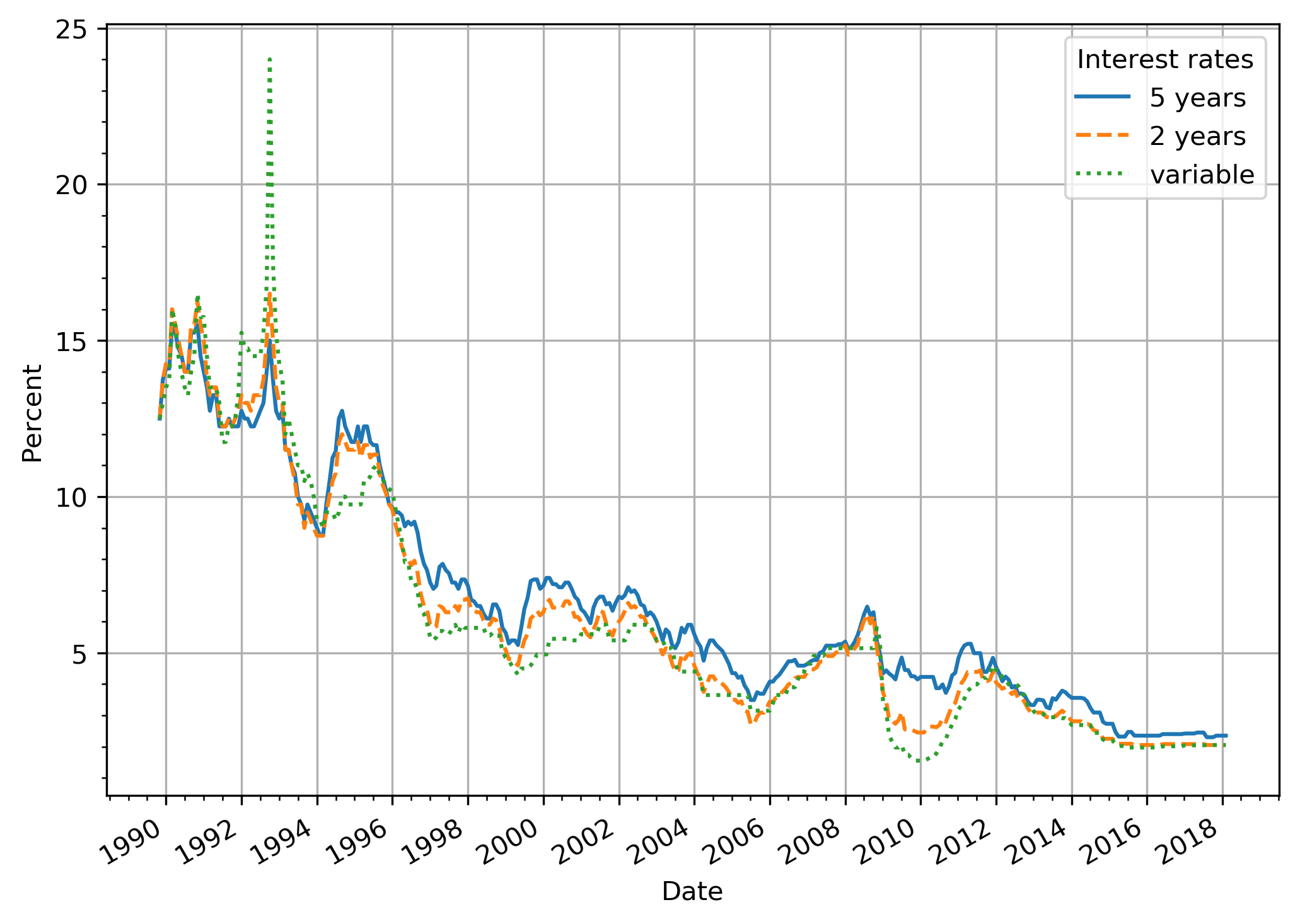
<p>If we graph the interest rates we get:</p>

<p><img src="/images/2018/03/rates.en.png" alt="Interest rates over time" /></p>

<p>You can see a clear peak in the variable rate when the riksbank set
the repo rate at 500% (mortgages &ldquo;only&rdquo; reached 24%). You can also see
that during the early nineties the variable rate was higher than the
fixed rates during relatively long periods. But to compare the actual
cost over the fixed term we have to compare average rates.</p>

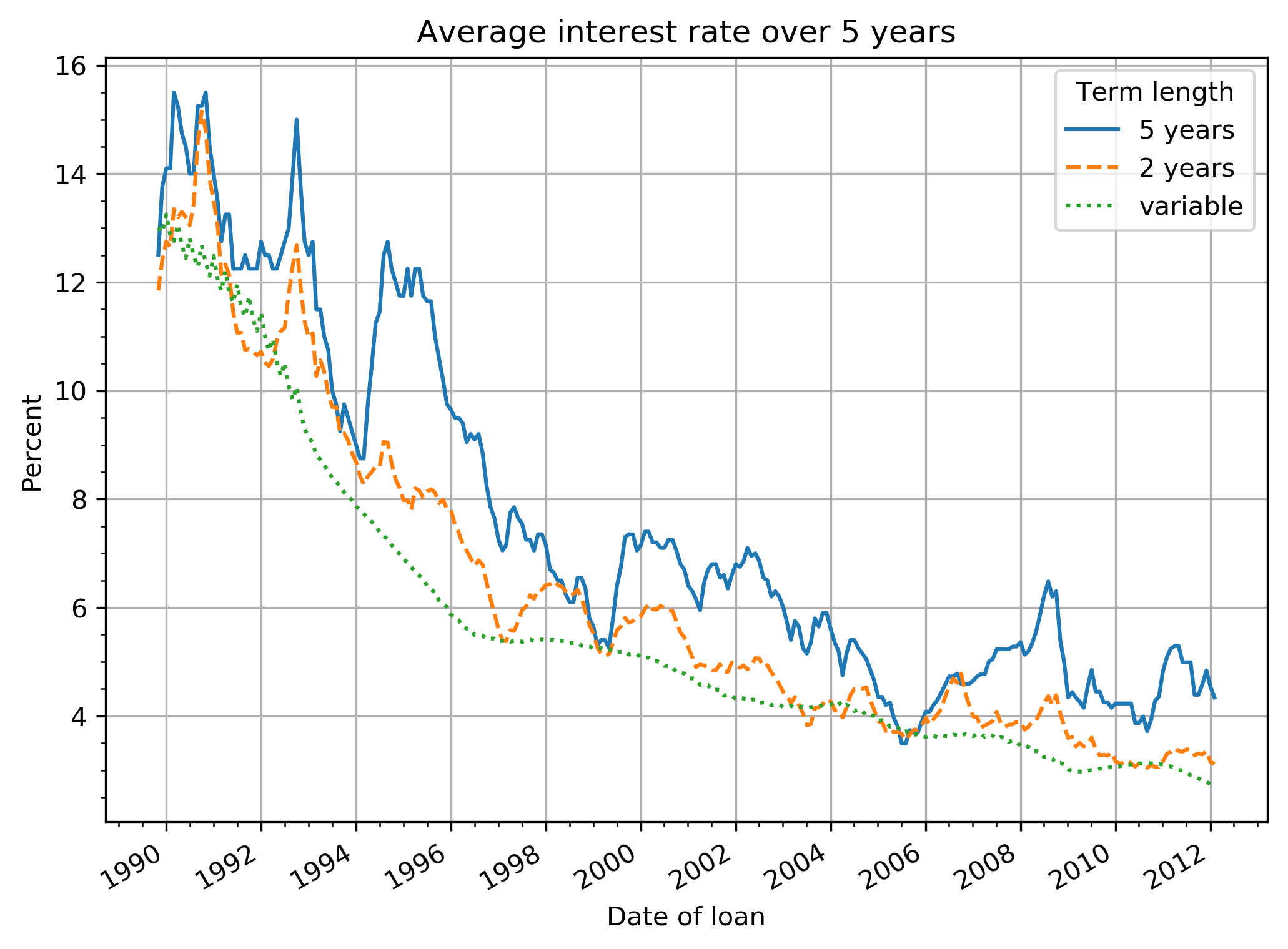
<p>For example, let us compare the actual average rates from the first of
July 1991 during 5 years for variable rate (11.96%) and 5 years fixed
term (12.25%). Even though with variable rate you&rsquo;d have had a rate of
24% during a quarter you&rsquo;d still pay less in total over the 5 years.</p>

<p>If the same calculation is made for every month you can see how much
you would have earned/lost depending on when you started your fixed
term. Since 5 years is not evenly divisible by 2 years, the 2 years
fixed term refers to what the average rate would have been during the
first 5 of the 6 years.</p>

<p><img src="/images/2018/03/5y_avg_rates.en.png" alt="Average interest rate over 5 years" /></p>

<p>It&rsquo;s quite clear that variable rate has nearly always been the most
profitable alternative. At three seperate occasions it would have been
more profitable to pick a 5 year fixed term: at the of 1989, the
beginning of 1997, and in the middle of 2005. I won&rsquo;t comment on the 2
years fixed term since it&rsquo;s not a fair comparison to only look at 5 out of
6 years.</p>

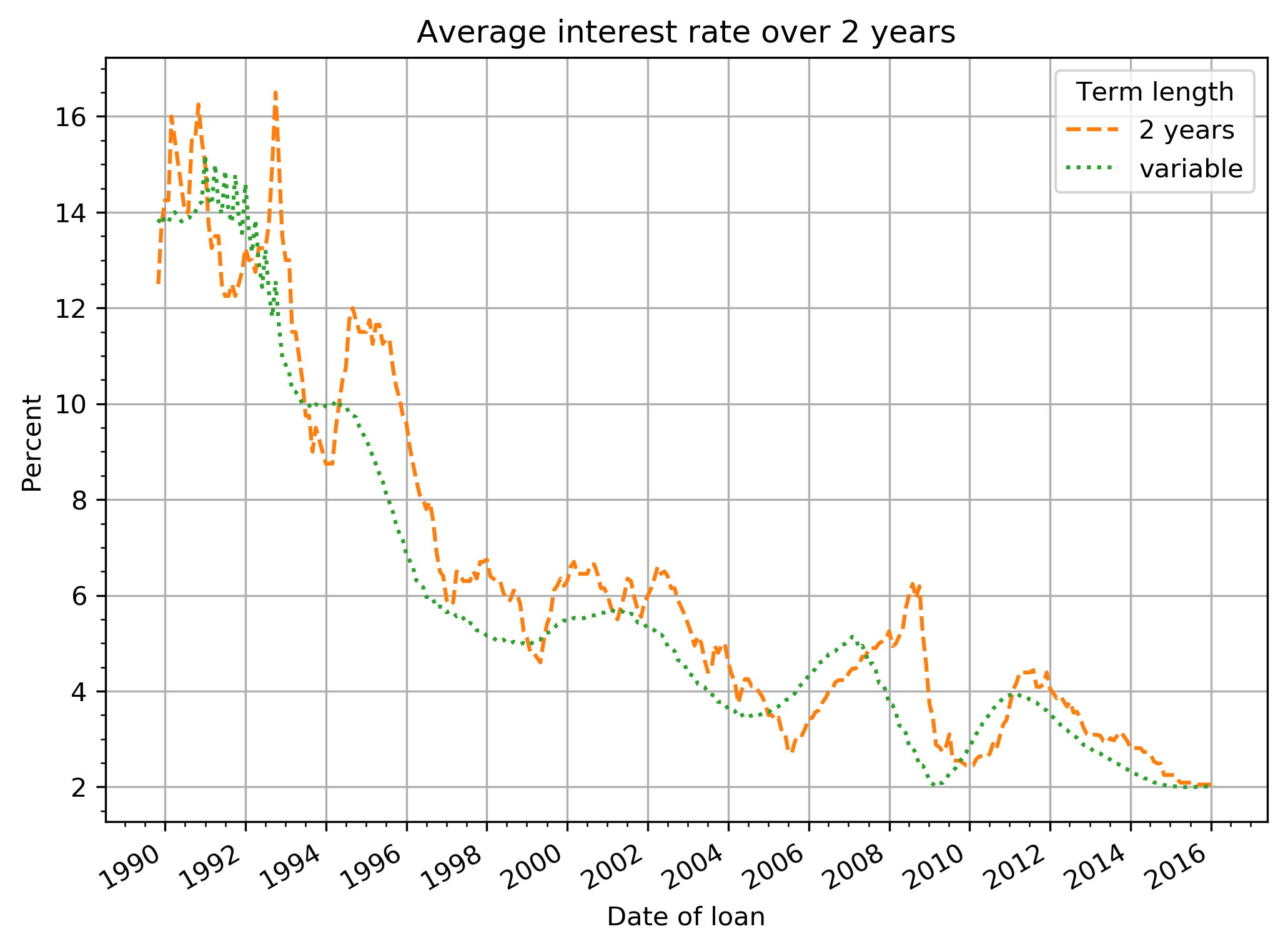
<p>If we compare 2 years fixed term with variable rate:</p>

<p><img src="/images/2018/03/2y_avg_rates.en.png" alt="Average interest rate over 2 years" /></p>

<p>Also here the most profitable choice is generally the variable rate
however during times of rising interest rates getting a fixed 2 year
term has been the better choice on several occasions. An important
difference to the 5 years term is that you&rsquo;re not locked in for long
when the rates finally go down again (and you&rsquo;re able to switch to
variable rate).</p>

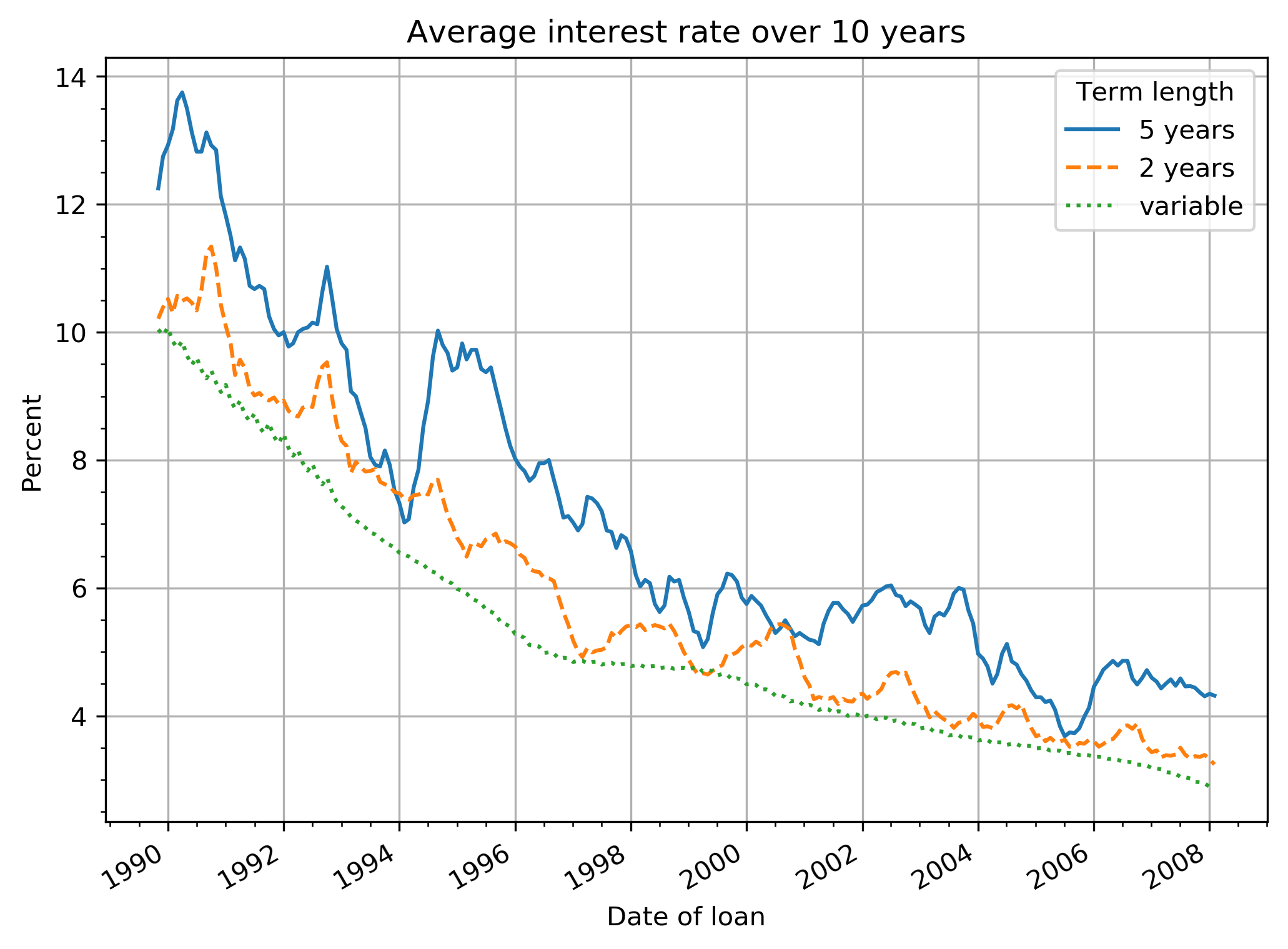
<p>If we compare all terms during 10 years:</p>

<p><img src="/images/2018/03/10y_avg_rates.en.png" alt="Average interest rate over 10 years" /></p>

<p>Here it is clear that the variable rate is the most profitable.</p>

<p>Even though it has been possible at certain occasions (29 years and
only 3 short occasions!) to get a fixed term for 5 years and pay less
overall than with variable rate, I think it&rsquo;s far too improbable that
one is able to do it at the right time. You&rsquo;re almost guaranteed to be
paying more in the end.</p>

<p>Getting a fixed term for 2 years is more probable to be profitable,
but even here it is more probable not to be.</p>
]]></content>
  </entry>
  
  <entry>
    <id>https://cowboyprogrammer.org/2016/10/reduce-colors-in-images/</id>
    <link href="https://cowboyprogrammer.org/2016/10/reduce-colors-in-images/" rel="alternate" />
    <title>Reduce the size of images even further by reducing number of colors with Gimp</title>
    <updated>2016-10-21T00:27:00+02:00</updated>
    <author>
      <name>Space Cowboy</name>
      <email>jonas@cowboyprogrammer.org</email>
    </author>
    
    <media:thumbnail url="https://cowboyprogrammer.org/images/2017/10/gimp_image_mode_index.png" />
    
    <summary type="html"><![CDATA[In Gimp you go to Image in the top menu bar and select Mode followed by Indexed. Now you see a popup where you can select the number of colors for a generated optimum palette.
You&rsquo;ll have to experiment a little because it will depend on your image.
I used this approach to shrink the size of the cover image in the_zopfli post from a 37KB (JPG) to just 15KB (PNG, all PNG sizes listed include Zopfli compression btw).]]></summary>
    <content type="html"><![CDATA[

<p>In Gimp you go to <em>Image</em> in the top menu bar and select <em>Mode</em>
followed by <em>Indexed</em>. Now you see a popup where you can select the
number of colors for a generated optimum palette.</p>

<p>You&rsquo;ll have to experiment a little because it will depend on your
image.</p>

<p>I used this approach to shrink the size of the cover image in
<a href="/2016/08/zopfli_all_the_things/">the_zopfli post</a> from a 37KB (JPG) to just 15KB
(PNG, all PNG sizes listed include Zopfli compression btw).</p>

<h2 id="straight-jpg-to-png-conversion-124kb">Straight JPG to PNG conversion: 124KB</h2>

<p><img src="/images/2017/10/zopfli_all_the_things.png" alt="PNG version RGB colors" /></p>

<p>First off, I exported the JPG file as a PNG file. This PNG file had a
whopping 124KB! Clearly there was some bloat being stored.</p>

<h2 id="256-colors-40kb">256 colors: 40KB</h2>

<p>Reducing from RGB to only 256 colors has no visible effect to my eyes.</p>

<p><img src="/images/2017/10/zopfli_all_the_things_256.png" alt="256 colors" /></p>

<h2 id="128-colors-34kb">128 colors: 34KB</h2>

<p>Still no difference.</p>

<p><img src="/images/2017/10/zopfli_all_the_things_128.png" alt="128 colors" /></p>

<h2 id="64-colors-25kb">64 colors: 25KB</h2>

<p>You can start to see some artifacting in the shadow behind the text.</p>

<p><img src="/images/2017/10/zopfli_all_the_things_64.png" alt="64 colors" /></p>

<h2 id="32-colors-15kb">32 colors: 15KB</h2>

<p>In my opinion this is the sweet spot. The shadow artifacting is barely
noticable but the size is significantly reduced.</p>

<p><img src="/images/2017/10/zopfli_all_the_things_32.png" alt="32 colors" /></p>

<h2 id="16-colors-11kb">16 colors: 11KB</h2>

<p>Clear artifacting in the text shadow and the yellow (fire?) in the
background has developed an outline.</p>

<p><img src="/images/2017/10/zopfli_all_the_things_16.png" alt="16 colors" /></p>

<h2 id="8-colors-7-3kb">8 colors: 7.3KB</h2>

<p>The broom has shifted in color from a clear brown to almost grey. Text
shadow is just a grey blob at this point. Even clearer outline
developed on the yellow background.</p>

<p><img src="/images/2017/10/zopfli_all_the_things_8.png" alt="8 colors" /></p>

<h2 id="4-colors-4-3kb">4 colors: 4.3KB</h2>

<p>Interestingly enough, I think 4 colors looks better than 8 colors. The outline in the background has disappeared because there&rsquo;s not enough color spectrum to render it. The broom is now black and filled areas tend to get a white separator to the outlines.</p>

<p><img src="/images/2017/10/zopfli_all_the_things_4.png" alt="4 colors" /></p>

<h2 id="2-colors-2-4kb">2 colors: 2.4KB</h2>

<p>Well, at least the silhouette is well defined at this point I guess.</p>

<p><img src="/images/2017/10/zopfli_all_the_things_2.png" alt="2 colors" /></p>
]]></content>
  </entry>
  
  <entry>
    <id>https://cowboyprogrammer.org/2016/10/dont-start-service-on-install-of-debian-package/</id>
    <link href="https://cowboyprogrammer.org/2016/10/dont-start-service-on-install-of-debian-package/" rel="alternate" />
    <title>Don&#39;t start service on installation of Debian package</title>
    <updated>2016-10-19T00:00:00+02:00</updated>
    <author>
      <name>Space Cowboy</name>
      <email>jonas@cowboyprogrammer.org</email>
    </author>
    
    <media:thumbnail url="https://cowboyprogrammer.org/images/Ardebian_logo_512_0.png" />
    
    <summary type="html"><![CDATA[A clear difference between Debian/Ubuntu and for example Red Hat/Fedora is that packages which include system services will enable and start those services at install time in Debian/Ubuntu whereas they will not start automatically in Red Hat/Fedora.
Sometimes it would be very convenient if the service would not start automatically, for example if you need to configure the service before starting it for the first time.
To prevent the automatic start of system services at install time in Debian, just set the RUNLEVEL environment variable like so:]]></summary>
    <content type="html"><![CDATA[<p>A clear difference between Debian/Ubuntu and for example Red
Hat/Fedora is that packages which include system services will enable
and start those services at install time in Debian/Ubuntu whereas they
will not start automatically in Red Hat/Fedora.</p>

<p>Sometimes it would be very convenient if the service would <em>not</em> start
automatically, for example if you need to configure the service before
starting it for the first time.</p>

<p>To prevent the automatic start of system services at install time in
Debian, just set the <code>RUNLEVEL</code> environment variable like so:</p>

<pre><code>RUNLEVEL=1 apt install -y PKG_NAME
</code></pre>

<p>Then you are free to configure your system before you start the
service for real:</p>

<pre><code>systemctl enable PKG_NAME
systemctl start PKG_NAME
</code></pre>
]]></content>
  </entry>
  
  <entry>
    <id>https://cowboyprogrammer.org/2016/09/reboot_machine_on_wrong_password/</id>
    <link href="https://cowboyprogrammer.org/2016/09/reboot_machine_on_wrong_password/" rel="alternate" />
    <title>Rebooting on wrong password</title>
    <updated>2016-09-28T22:57:21+02:00</updated>
    <author>
      <name>Space Cowboy</name>
      <email>jonas@cowboyprogrammer.org</email>
    </author>
    
    <summary type="html"><![CDATA[Having an encrypted hard drive is all well and good, but chances are that if someone is gonna steal your laptop, it&rsquo;s probably not going to be turned off. Most likely, it will be stolen in a powered-on state. And so your encrypted hard drive doesn&rsquo;t increase your security at all since it&rsquo;s currently unlocked.
In my mind, it&rsquo;s a slight improvement if the computer somehow can shutdown if someone is trying to gain access to it.]]></summary>
    <content type="html"><![CDATA[

<p>Having an encrypted hard drive is all well and good, but chances are
that if someone is gonna steal your laptop, it&rsquo;s probably not going to
be turned off. Most likely, it will be stolen in a powered-on
state. And so your encrypted hard drive doesn&rsquo;t increase your security
at all since it&rsquo;s currently unlocked.</p>

<p>In my mind, it&rsquo;s a slight improvement if the computer somehow can
shutdown if someone is trying to gain access to it. That way, the hard
drive is no longer accessible and the number of possible attack
vectors go down drastically. And so, if you type the wrong password 3
times on my laptop, it shuts down.</p>

<p>This is accomplished by using <code>PAM</code>, and its ability to invoke an
arbitrary script as part of the login flow via <code>pam_exec.so</code>. The
script itself looks like this:</p>
<div class="highlight"><pre style="background-color:#f0f0f0;-moz-tab-size:4;-o-tab-size:4;tab-size:4"><code class="language-shell" data-lang="shell"><span style="color:#007020">#!/bin/bash
</span><span style="color:#007020"></span><span style="color:#60a0b0;font-style:italic"># Do not add -eu, you need to allow empty variables here!</span>

<span style="color:#60a0b0;font-style:italic"># To be used with PAM. Look in /etc/pam.d for the script that your</span>
<span style="color:#60a0b0;font-style:italic"># screensaver etc uses. Typically it references common-account and common-auth.</span>
#
<span style="color:#60a0b0;font-style:italic"># In common-auth, add this as the first line</span>
<span style="color:#60a0b0;font-style:italic">#auth       optional     pam_exec.so debug /path/to/wrongpassword.sh</span>
#
<span style="color:#60a0b0;font-style:italic"># In common-account, add this as the first line</span>
<span style="color:#60a0b0;font-style:italic">#account    required     pam_exec.so debug /path/to/wrongpassword.sh</span>
#

<span style="color:#bb60d5">COUNTFILE</span><span style="color:#666">=</span><span style="color:#4070a0">&#34;/var/log/failed_login_count&#34;</span>

<span style="color:#60a0b0;font-style:italic"># Make sure file exists</span>
<span style="color:#007020;font-weight:bold">if</span> <span style="color:#666">[</span> ! -f <span style="color:#4070a0">&#34;</span><span style="color:#70a0d0;font-style:italic">${</span><span style="color:#bb60d5">COUNFILE</span><span style="color:#70a0d0;font-style:italic">}</span><span style="color:#4070a0">&#34;</span> <span style="color:#666">]</span>;<span style="color:#007020;font-weight:bold">then</span>
  touch <span style="color:#4070a0">&#34;</span><span style="color:#70a0d0;font-style:italic">${</span><span style="color:#bb60d5">COUNTFILE</span><span style="color:#70a0d0;font-style:italic">}</span><span style="color:#4070a0">&#34;</span>
  chmod <span style="color:#40a070">777</span> <span style="color:#4070a0">&#34;</span><span style="color:#70a0d0;font-style:italic">${</span><span style="color:#bb60d5">COUNTFILE</span><span style="color:#70a0d0;font-style:italic">}</span><span style="color:#4070a0">&#34;</span>
<span style="color:#007020;font-weight:bold">fi</span>

<span style="color:#60a0b0;font-style:italic"># Read value in it</span>
<span style="color:#bb60d5">COUNT</span><span style="color:#666">=</span><span style="color:#007020;font-weight:bold">$(</span>cat <span style="color:#4070a0">&#34;</span><span style="color:#70a0d0;font-style:italic">${</span><span style="color:#bb60d5">COUNTFILE</span><span style="color:#70a0d0;font-style:italic">}</span><span style="color:#4070a0">&#34;</span><span style="color:#007020;font-weight:bold">)</span>
<span style="color:#60a0b0;font-style:italic"># Increment it</span>
<span style="color:#bb60d5">COUNT</span><span style="color:#666">=</span><span style="color:#007020;font-weight:bold">$((</span>COUNT+1<span style="color:#007020;font-weight:bold">))</span>
<span style="color:#007020">echo</span> <span style="color:#4070a0">&#34;</span><span style="color:#70a0d0;font-style:italic">${</span><span style="color:#bb60d5">COUNT</span><span style="color:#70a0d0;font-style:italic">}</span><span style="color:#4070a0">&#34;</span> &gt; <span style="color:#4070a0">&#34;</span><span style="color:#70a0d0;font-style:italic">${</span><span style="color:#bb60d5">COUNTFILE</span><span style="color:#70a0d0;font-style:italic">}</span><span style="color:#4070a0">&#34;</span>

<span style="color:#60a0b0;font-style:italic"># if authentication</span>
<span style="color:#007020;font-weight:bold">if</span> <span style="color:#666">[</span> <span style="color:#4070a0">&#34;</span><span style="color:#70a0d0;font-style:italic">${</span><span style="color:#bb60d5">PAM_TYPE</span><span style="color:#70a0d0;font-style:italic">}</span><span style="color:#4070a0">&#34;</span> <span style="color:#666">==</span> <span style="color:#4070a0">&#34;auth&#34;</span> <span style="color:#666">]</span>; <span style="color:#007020;font-weight:bold">then</span>
  <span style="color:#60a0b0;font-style:italic"># The count will be at 4 after 3 wrong tries</span>
  <span style="color:#007020;font-weight:bold">if</span> <span style="color:#666">[</span> <span style="color:#4070a0">&#34;</span><span style="color:#70a0d0;font-style:italic">${</span><span style="color:#bb60d5">COUNT</span><span style="color:#70a0d0;font-style:italic">}</span><span style="color:#4070a0">&#34;</span> -ge <span style="color:#40a070">4</span> <span style="color:#666">]</span>; <span style="color:#007020;font-weight:bold">then</span>
    <span style="color:#60a0b0;font-style:italic"># Shutdown in 1 min</span>
    <span style="color:#60a0b0;font-style:italic">#/usr/bin/shutdown --no-wall -h +1</span>
    <span style="color:#60a0b0;font-style:italic"># This is a hack because the line above gives a segfault in logind</span>
    <span style="color:#007020">echo</span> <span style="color:#4070a0">&#34;0&#34;</span> &gt; <span style="color:#4070a0">&#34;</span><span style="color:#70a0d0;font-style:italic">${</span><span style="color:#bb60d5">COUNTFILE</span><span style="color:#70a0d0;font-style:italic">}</span><span style="color:#4070a0">&#34;</span>
    systemctl poweroff
  <span style="color:#007020;font-weight:bold">fi</span>
<span style="color:#60a0b0;font-style:italic"># If authentication succeeded, and we are now in account phase</span>
<span style="color:#007020;font-weight:bold">elif</span> <span style="color:#666">[</span> <span style="color:#4070a0">&#34;</span><span style="color:#70a0d0;font-style:italic">${</span><span style="color:#bb60d5">PAM_TYPE</span><span style="color:#70a0d0;font-style:italic">}</span><span style="color:#4070a0">&#34;</span> <span style="color:#666">==</span> <span style="color:#4070a0">&#34;account&#34;</span> <span style="color:#666">]</span>; <span style="color:#007020;font-weight:bold">then</span>
  <span style="color:#007020">echo</span> <span style="color:#4070a0">&#34;0&#34;</span> &gt; <span style="color:#4070a0">&#34;</span><span style="color:#70a0d0;font-style:italic">${</span><span style="color:#bb60d5">COUNTFILE</span><span style="color:#70a0d0;font-style:italic">}</span><span style="color:#4070a0">&#34;</span>
  <span style="color:#60a0b0;font-style:italic"># Cancel shutdown which was just issued</span>
  shutdown -c
<span style="color:#007020;font-weight:bold">fi</span>

<span style="color:#007020">exit</span> <span style="color:#40a070">0</span></code></pre></div>
<p>On my Debian system, PAM ends up looking at <code>/etc/pam.d/common-auth</code>
and <code>/etc/pam.d/common-account</code>. These are invoked in different parts
of the authentication flow. In <code>common-auth</code>, add this as the first
line:</p>
<div class="highlight"><pre style="background-color:#f0f0f0;-moz-tab-size:4;-o-tab-size:4;tab-size:4"><code class="language-text" data-lang="text">auth optional pam_exec.so debug /path/to/wrongpassword.sh</code></pre></div>
<p>And then in <code>common-account</code>, add this as the first line:</p>
<div class="highlight"><pre style="background-color:#f0f0f0;-moz-tab-size:4;-o-tab-size:4;tab-size:4"><code class="language-text" data-lang="text">account required pam_exec.so debug /path/to/wrongpassword.sh</code></pre></div>
<p>You can try it immediately if it works. Lock your screen, and type the
wrong password 4 times. If it works, your computer should shut down.</p>

<h2 id="warning-do-not-enable-on-servers">WARNING: DO NOT ENABLE ON SERVERS</h2>

<p>This is <strong>NOT</strong> something you want to do on any machine. Most notably,
it&rsquo;s probably a huge mistake to copy this verbatim on a machine which
accepts remote connections. In that case, you essentially enable
anyone to DOS you by entering the wrong password via SSH or
similarly. So don&rsquo;t do this if you allow remote connections to your
machine (which shouldn&rsquo;t be a thing on a laptop).</p>
]]></content>
  </entry>
  
  <entry>
    <id>https://cowboyprogrammer.org/2016/08/zopfli_all_the_things/</id>
    <link href="https://cowboyprogrammer.org/2016/08/zopfli_all_the_things/" rel="alternate" />
    <title>Compress all the images!</title>
    <updated>2016-08-26T13:17:40+02:00</updated>
    <author>
      <name>Space Cowboy</name>
      <email>jonas@cowboyprogrammer.org</email>
    </author>
    
    <media:thumbnail url="https://cowboyprogrammer.org/images/2017/10/zopfli_all_the_things_32.png" />
    
    <summary type="html"><![CDATA[Update 2016-11-22: Made the Makefile compatible with BSD sed (MacOS)
One advantage that static sites, such as those built by Hugo, provide is fast loading times. Because there is no processing to be done, no server side rendering, no database lookups, loading times are just as fast as you can serve the files that make up the page. This means that bandwidth becomes the primary bottleneck, which incidentally is one of the factors used by Google to calculate your search ranking.]]></summary>
    <content type="html"><![CDATA[

<p><em>Update 2016-11-22: Made the Makefile compatible with BSD sed (MacOS)</em></p>

<p>One advantage that static sites, such as those built by <a href="https://gohugo.io">Hugo</a>,
provide is fast loading times. Because there is no processing to be
done, no server side rendering, no database lookups, loading times are
just as fast as you can serve the files that make up the page. This
means that bandwidth becomes the primary bottleneck, which
incidentally is
<a href="https://webmasters.googleblog.com/2010/04/using-site-speed-in-web-search-ranking.html">one of the factors used by Google to calculate your search ranking</a>. See
also
<a href="https://developers.google.com/speed/pagespeed/insights">Pagespeed Insights</a>.</p>

<h2 id="compressing-images">Compressing images</h2>

<p>Because the largest pieces of a page typically consist of images, it
stands to reason that if we can make the images smaller, we can make
the page load faster. Luckily there exists methods that can compress
images <em>losslessly</em>. That means that the quality stays exactly the
same, the page only loads faster. That seemed like a no-brainer to me
so I compressed all the images on the site using <a href="http://advsys.net/ken/utils.htm">PNGout</a> as
<a href="https://blog.codinghorror.com/getting-the-most-out-of-png/">advised by Jeff Atwood</a>. I mean, who doesn&rsquo;t
like free bandwidth?</p>

<p>A new algorithm called <a href="https://github.com/google/zopfli">Zopfli</a> (open sourced by Google,
<a href="https://blog.codinghorror.com/zopfli-optimization-literally-free-bandwidth/">also mentioned by Jeff</a>) claims even better
results than PNGout though. Results on this site&rsquo;s images confirm
those claims. Running the tool on images <em>already compressed by
PNGout</em> gives output such as this:</p>
<div class="highlight"><pre style="background-color:#f0f0f0;-moz-tab-size:4;-o-tab-size:4;tab-size:4"><code class="language-text" data-lang="text">./zopflipng --prefix=&#34;zopfli_&#34; static/images/2014/Dec/Screenshot-from-2014-12-29-13-28-29.png
Optimizing static/images/2014/Dec/Screenshot-from-2014-12-29-13-28-29.png
Input size: 89420 (87K)
Result size: 90361 (88K). Percentage of original: 101.052%
Preserving original PNG since it was smaller

./zopflipng --prefix=&#34;zopfli_&#34; static/images/2014/Jun/Jenkins_install_git.png
Optimizing static/images/2014/Jun/Jenkins_install_git.png
Input size: 189406 (184K)
Result size: 166362 (162K). Percentage of original: 87.834%
Result is smaller

./zopflipng --prefix=&#34;zopfli_&#34; static/images/2014/Jun/jenkins_batch.png
Optimizing static/images/2014/Jun/jenkins_batch.png
Input size: 21933 (21K)
Result size: 16255 (15K). Percentage of original: 74.112%
Result is smaller

./zopflipng --prefix=&#34;zopfli_&#34; static/images/2014/Jun/jenkins_build_step.png
Optimizing static/images/2014/Jun/jenkins_build_step.png
Input size: 8184 (7K)
Result size: 6809 (6K). Percentage of original: 83.199%
Result is smaller

./zopflipng --prefix=&#34;zopfli_&#34; static/images/2014/Jun/jenkins_config_git.png
Optimizing static/images/2014/Jun/jenkins_config_git.png
Input size: 57897 (56K)
Result size: 47164 (46K). Percentage of original: 81.462%
Result is smaller</code></pre></div>
<p>The first result in the example output shows a case where Zopfli would
actually have made the file bigger (because it was already compressed
by PNGout, remember). This is nothing you have to worry about because
it&rsquo;s actually smart enough that it simply copies the original file in
that case.</p>

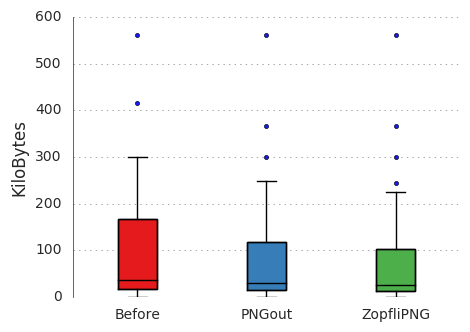
<p>Comparing to both before any compression, and PNGout, yielded the
following results:</p>

<table>
<thead>
<tr>
<th></th>
<th>Mean relative size</th>
</tr>
</thead>
<tbody>

<tr>
<td>Before</td>
<td>1.00</td>
</tr>

<tr>
<td>PNGout</td>
<td>0.84</td>
</tr>

<tr>
<td>ZopfliPNG</td>
<td>0.77</td>
</tr>

</tbody>
</table>

<p><a href="https://en.wikipedia.org/wiki/Box_plot">Box plot</a> of results on all images:</p>

<p><img src="/images/zopfli_boxplot.png" alt="Compression results" /></p>

<p>Source files: <a href="/csv/before.csv">before.csv</a>,
<a href="/csv/pngout.csv">pngout.csv</a>, <a href="/csv/zopfli.csv">zopfli.csv</a></p>

<p>And this is with the default arguments. It is possible squeeze yet a
couple of more bytes out of this if you&rsquo;re willing to wait longer.</p>

<h2 id="automate-it-with-make">Automate it with Make</h2>

<p>Another joy of using a simple static site is that it is possible to
compose regular tools to do useful things. Tools like
<a href="https://www.gnu.org/software/make/">Make</a>. And we can use Make to build the site, as well as
compressing images which have not already been compressed. You could
do it manually for each new image that you add of course but be
honest, you <em>know</em> that you&rsquo;re gonna forget to do it at some point. So
let&rsquo;s automate it instead!</p>

<p>This is the Makefile that I use to build this site with, note that
<code>public</code> depends on <code>$(PNG_SENTINELS)</code>, so I literally can&rsquo;t forget to
compress any new images added:</p>
<div class="highlight"><pre style="background-color:#f0f0f0;-moz-tab-size:4;-o-tab-size:4;tab-size:4"><code class="language-make" data-lang="make"><span style="color:#06287e">.PHONY</span><span style="color:#666">:</span> help build server server-with-drafts clean zopfli

<span style="color:#bb60d5">PNG_SENTINELS</span><span style="color:#666">:=</span> <span style="color:#007020;font-weight:bold">$(</span>shell find . -path ./public -prune -o -name <span style="color:#4070a0">&#39;*.png&#39;</span> -print | sed <span style="color:#4070a0">&#39;s|\(.\+/\)\(.\+.png\)|\1.\2.zopfli|g&#39;</span><span style="color:#007020;font-weight:bold">)</span>

<span style="color:#06287e">help</span><span style="color:#666">:</span> <span style="color:#60a0b0;font-style:italic">## Print this help text
</span><span style="color:#60a0b0;font-style:italic"></span>	@grep -E <span style="color:#4070a0">&#39;^[a-zA-Z_-]+:.*?## .*$$&#39;</span> <span style="color:#007020;font-weight:bold">$(</span>MAKEFILE_LIST<span style="color:#007020;font-weight:bold">)</span> | awk <span style="color:#4070a0">&#39;BEGIN {FS = &#34;:.*?## &#34;}; {printf &#34;\033[36m%-30s\033[0m %s\n&#34;, $$1, $$2}&#39;</span>

<span style="color:#06287e">server</span><span style="color:#666">:</span> <span style="color:#60a0b0;font-style:italic">## Run hugo server
</span><span style="color:#60a0b0;font-style:italic"></span>	hugo server

<span style="color:#06287e">server-with-drafts</span><span style="color:#666">:</span> <span style="color:#60a0b0;font-style:italic">## Run hugo server and include drafts
</span><span style="color:#60a0b0;font-style:italic"></span>	hugo server -D

<span style="color:#06287e">build</span><span style="color:#666">:</span> public <span style="color:#60a0b0;font-style:italic">## Build site (will also compress images using zopfli)
</span><span style="color:#60a0b0;font-style:italic"></span>
<span style="color:#06287e">zopfli</span><span style="color:#666">:</span> <span style="color:#007020;font-weight:bold">$(</span><span style="color:#bb60d5">PNG_SENTINELS</span><span style="color:#007020;font-weight:bold">)</span> <span style="color:#60a0b0;font-style:italic">## Compress new images using zopfli
</span><span style="color:#60a0b0;font-style:italic"></span>
<span style="color:#06287e">clean</span><span style="color:#666">:</span> <span style="color:#60a0b0;font-style:italic">## Remove the built directory
</span><span style="color:#60a0b0;font-style:italic"></span>	@rm -rf public

<span style="color:#06287e">public</span><span style="color:#666">:</span> <span style="color:#007020;font-weight:bold">$(</span><span style="color:#bb60d5">PNG_SENTINELS</span><span style="color:#007020;font-weight:bold">)</span>
	@rm -rf public
	hugo

<span style="color:#60a0b0;font-style:italic"># Zopfli sentinel rule, assumes zopflipng binary is in the same folder
</span><span style="color:#60a0b0;font-style:italic"></span><span style="color:#06287e">.%.png.zopfli</span><span style="color:#666">:</span> %.png
	./zopflipng --prefix<span style="color:#666">=</span><span style="color:#4070a0">&#34;zopfli_&#34;</span> $&lt;
	@mv <span style="color:#007020;font-weight:bold">$(</span>dir $&lt;<span style="color:#007020;font-weight:bold">)</span>zopfli_<span style="color:#007020;font-weight:bold">$(</span>notdir $&lt;<span style="color:#007020;font-weight:bold">)</span> $&lt;
	@touch <span style="color:#bb60d5">$@</span>
</code></pre></div>
<p>For best performance, run make with parallel jobs (change 4 to your
number CPUs): <code>make -j4 zopfli</code>.</p>

<p>To know which files have already been compressed without actually
running Zopfli on it again (which takes a while), sentinel files are
created with this pattern: <code>.&lt;imgfilename&gt;.zopfli</code>.  Thus, the next
time around, zopfli is only invoked for files which have <em>not</em> already
been compressed, making it a one-time operation. And when everything
has already been compressed, you&rsquo;ll just get this:</p>
<div class="highlight"><pre style="background-color:#f0f0f0;-moz-tab-size:4;-o-tab-size:4;tab-size:4"><code class="language-text" data-lang="text">make: Nothing to be done for &#39;zopfli&#39;.</code></pre></div>]]></content>
  </entry>
  
  <entry>
    <id>https://cowboyprogrammer.org/2016/07/migrating_from_ghost_to_hugo/</id>
    <link href="https://cowboyprogrammer.org/2016/07/migrating_from_ghost_to_hugo/" rel="alternate" />
    <title>Migrating from Ghost to Hugo</title>
    <updated>2016-07-25T23:55:38+02:00</updated>
    <author>
      <name>Space Cowboy</name>
      <email>jonas@cowboyprogrammer.org</email>
    </author>
    
    <media:thumbnail url="https://cowboyprogrammer.org/images/hugo-logo.png" />
    
    <summary type="html"><![CDATA[So I recently migrated this site from Ghost to Hugo after reading a nice article about the Hugo in Linux Voice #20 (funnily enough, the same issue also features an article about Ghost). I originally made the switch to Ghost from Jekyll back in 2014 or so mainly because I could not find a good theme to use. Ghost also seemed to have a lot of cool features and it&rsquo;s fun to try new things.]]></summary>
    <content type="html"><![CDATA[

<p>So I recently migrated this site from <a href="https://ghost.org">Ghost</a> to <a href="https://gohugo.io">Hugo</a>
after reading a nice article about the Hugo in
<a href="https://www.linuxvoice.com/download-linux-voice-issue-20/">Linux Voice #20</a> (funnily enough, the same issue also
features an article about Ghost). I originally made the switch to
Ghost from <a href="https://jekyllrb.com/">Jekyll</a> back in 2014 or so mainly because I could
not find a good theme to use. Ghost also seemed to have a lot of cool
features and it&rsquo;s fun to try new things.</p>

<p>I think it&rsquo;s safe to say that I am hardly a prolific blogger. I mainly
write about stuff which I personally cannot find on the web which I
think should exist, because I will likely need it myself sometime in
the future. So it&rsquo;s hardly a surprise that I am not in the target
audience for Ghost.</p>

<h2 id="things-about-ghost-which-annoy-me">Things about Ghost which annoy me</h2>

<ul>
<li>It&rsquo;s written in NodeJS &mdash; people who think JS is a good server
language also tend to think that it&rsquo;s a good idea to depend on just
about any package, and download it in every single build. Which
becomes really <a href="http://www.theregister.co.uk/2016/03/23/npm_left_pad_chaos/">funny sometimes</a>.</li>
<li>Poor selection of <a href="http://marketplace.ghost.org/">themes</a> &mdash; this is subjective of
course, but it seems to me that the free options don&rsquo;t have much in
terms of diversity. Heck, they even call it a <em>marketplace</em> which
rubs me the wrong way.</li>
<li>Themes end up being quite reliant on JS if you want necessary
features like syntax highlighting on code snippets &mdash; I often
browse with JS disabled and should be able to view my own site.</li>
<li>Markdown parser treats newlines as significant &mdash; meaning you can&rsquo;t
have properly aligned paragraphs in your editor.</li>
</ul>

<p>That last point irritates me deeply but it&rsquo;s not as bad as the next point.</p>

<ul>
<li>You can effectively lock an account by entering the wrong password 3
times.</li>
</ul>

<p>This requires some explanation. So Ghost, targeting teams of bloggers
really, naturally have an account system much like Wordpress. Now, as
I was surveying the security status of other services I am running, I
was wondering how Ghost handled someone trying to brute force your
account and decided to simply try it out. Type the wrong password once
too many, and this happens:</p>

<p><img src="/images/ghost_wrong_password.png" alt="Ghost: typing the wrong password too many times locks your account" /></p>

<p>It doesn&rsquo;t lock it for a single IP address (I tried from several), it
locks the entire account.  Effectively, someone can just set up a
script to try an account indefinitely simply with the intention to
block someone from logging in.</p>

<p>The log doesn&rsquo;t even show login attempts, so there is no way to
implement sensible blocking strategies using something like <a href="http://www.fail2ban.org">fail2ban</a>.</p>

<p>The whole thing left a bad taste my mouth so it was a very suitable timing to read an article on <a href="https://gohugo.io">Hugo</a>.</p>

<h2 id="things-about-hugo-which-excite-me">Things about Hugo which excite me</h2>

<ul>
<li>Markdown parser treats newlines correctly</li>
<li>It&rsquo;s a static site generator and not a service &mdash; this meant 100MB
(10%) of RAM became available on my server and there is no account
to hack (or block).</li>
<li>Supports everything of Ghost (that I am aware of).</li>
<li>The simplicity of Hugo makes it <a href="https://npf.io/2014/08/making-it-a-series/">quite painless</a> to
do useful things compared to
<a href="https://github.com/TryGhost/Ghost/issues/4818">ignored feature requests</a> for the same in Ghost.</li>
<li>Can do server side syntax highlighting using Pygments.</li>
<li>Some really nice <a href="http://themes.gohugo.io/">themes</a> are available, and they are
all free.</li>
</ul>

<h2 id="migrating-all-data-from-ghost">Migrating all data from Ghost</h2>

<p>Migrating from Ghost also turned about to be really painless. There
were several scripts around for exactly this but they all turned out
to be written in <a href="https://gist.github.com/vjeantet/d1f6cf824a2344dd6b4e">odd languages</a>, and did not actually
migrate all the metadata in Ghost. So I wrote my own in Python with
these <em>killer features</em>:</p>

<ul>
<li>Migrates tags.</li>
<li>Migrates dates.</li>
<li>Migrates drafts as drafts.</li>
<li>Creates aliases in your posts which makes sure that old permalinks
will still work!</li>
<li>Migrates cover pictures as banner images, just select a theme which
support them.</li>
<li>Rewrites all relative links so they all still work (this includes
images).</li>
<li>Code blocks with language definitions like <code>```language-java</code>
are changed to <code>```java</code>.</li>
</ul>
<div class="highlight"><pre style="background-color:#f0f0f0;-moz-tab-size:4;-o-tab-size:4;tab-size:4"><code class="language-python" data-lang="python"><span style="color:#60a0b0;font-style:italic">#!/usr/bin/env python3</span>
<span style="color:#60a0b0;font-style:italic"># -*- coding: utf-8 -*-</span>
<span style="color:#4070a0">&#39;&#39;&#39;
</span><span style="color:#4070a0">A simple program which migrates an exported Ghost blog to Hugo.
</span><span style="color:#4070a0">It assumes your blog is using the hugo-icarus theme, but should
</span><span style="color:#4070a0">work for any theme. The script will migrate your posts, including
</span><span style="color:#4070a0">tags and banner images. Furthermore, it will make sure that
</span><span style="color:#4070a0">all your old post urls will keep working by adding aliases to them.
</span><span style="color:#4070a0">
</span><span style="color:#4070a0">The only thing you need to do yourself is copying the `images/`
</span><span style="color:#4070a0">directory in your ghost directory to `static/images/` in your hugo
</span><span style="color:#4070a0">directory. That way, all images will work. The script will rewrite
</span><span style="color:#4070a0">all urls linking to `/content/images` to just `/images`.
</span><span style="color:#4070a0">&#39;&#39;&#39;</span>

<span style="color:#007020;font-weight:bold">import</span> <span style="color:#0e84b5;font-weight:bold">argparse</span>
<span style="color:#007020;font-weight:bold">import</span> <span style="color:#0e84b5;font-weight:bold">json</span>
<span style="color:#007020;font-weight:bold">from</span> <span style="color:#0e84b5;font-weight:bold">datetime</span> <span style="color:#007020;font-weight:bold">import</span> date
<span style="color:#007020;font-weight:bold">from</span> <span style="color:#0e84b5;font-weight:bold">os</span> <span style="color:#007020;font-weight:bold">import</span> path
<span style="color:#007020;font-weight:bold">from</span> <span style="color:#0e84b5;font-weight:bold">collections</span> <span style="color:#007020;font-weight:bold">import</span> defaultdict
<span style="color:#007020;font-weight:bold">import</span> <span style="color:#0e84b5;font-weight:bold">re</span>

_post <span style="color:#666">=</span> <span style="color:#4070a0">&#39;&#39;&#39;
</span><span style="color:#4070a0">+++
</span><span style="color:#4070a0">date = &#34;{date}&#34;
</span><span style="color:#4070a0">draft = {draft}
</span><span style="color:#4070a0">title = &#34;&#34;&#34;{title}&#34;&#34;&#34;
</span><span style="color:#4070a0">slug = &#34;{slug}&#34;
</span><span style="color:#4070a0">tags = {tags}
</span><span style="color:#4070a0">banner = &#34;{banner}&#34;
</span><span style="color:#4070a0">aliases = {aliases}
</span><span style="color:#4070a0">+++
</span><span style="color:#4070a0">
</span><span style="color:#4070a0">{markdown}
</span><span style="color:#4070a0">&#39;&#39;&#39;</span>


<span style="color:#007020;font-weight:bold">def</span> <span style="color:#06287e">migrate</span>(filepath, hugodir):
    <span style="color:#4070a0">&#39;&#39;&#39;
</span><span style="color:#4070a0">    Parse the Ghost json file and write post files
</span><span style="color:#4070a0">    &#39;&#39;&#39;</span>
    <span style="color:#007020;font-weight:bold">with</span> <span style="color:#007020">open</span>(filepath, <span style="color:#4070a0">&#34;r&#34;</span>) <span style="color:#007020;font-weight:bold">as</span> fp:
        ghost <span style="color:#666">=</span> json<span style="color:#666">.</span>load(fp)

    data <span style="color:#666">=</span> ghost[<span style="color:#4070a0">&#39;db&#39;</span>][<span style="color:#40a070">0</span>][<span style="color:#4070a0">&#39;data&#39;</span>]

    tags <span style="color:#666">=</span> {}
    <span style="color:#007020;font-weight:bold">for</span> tag <span style="color:#007020;font-weight:bold">in</span> data[<span style="color:#4070a0">&#34;tags&#34;</span>]:
        tags[tag[<span style="color:#4070a0">&#34;id&#34;</span>]] <span style="color:#666">=</span> tag[<span style="color:#4070a0">&#34;name&#34;</span>]

    posttags <span style="color:#666">=</span> defaultdict(<span style="color:#007020">list</span>)

    <span style="color:#007020;font-weight:bold">for</span> posttag <span style="color:#007020;font-weight:bold">in</span> data[<span style="color:#4070a0">&#34;posts_tags&#34;</span>]:
        posttags[posttag[<span style="color:#4070a0">&#34;post_id&#34;</span>]]<span style="color:#666">.</span>append(tags[posttag[<span style="color:#4070a0">&#34;tag_id&#34;</span>]])

    <span style="color:#007020;font-weight:bold">for</span> post <span style="color:#007020;font-weight:bold">in</span> data[<span style="color:#4070a0">&#39;posts&#39;</span>]:
        draft <span style="color:#666">=</span> <span style="color:#4070a0">&#34;true&#34;</span> <span style="color:#007020;font-weight:bold">if</span> post[<span style="color:#4070a0">&#34;status&#34;</span>] <span style="color:#666">==</span> <span style="color:#4070a0">&#34;draft&#34;</span> <span style="color:#007020;font-weight:bold">else</span> <span style="color:#4070a0">&#34;false&#34;</span>
        ts <span style="color:#666">=</span> <span style="color:#007020">int</span>(post[<span style="color:#4070a0">&#34;created_at&#34;</span>]) <span style="color:#666">/</span> <span style="color:#40a070">1000</span>

        banner <span style="color:#666">=</span> <span style="color:#4070a0">&#34;&#34;</span> <span style="color:#007020;font-weight:bold">if</span> post[<span style="color:#4070a0">&#34;image&#34;</span>] <span style="color:#007020;font-weight:bold">is</span> None <span style="color:#007020;font-weight:bold">else</span> post[<span style="color:#4070a0">&#34;image&#34;</span>]
        <span style="color:#60a0b0;font-style:italic"># /content/ should not be part of uri anymore</span>
        banner <span style="color:#666">=</span> re<span style="color:#666">.</span>sub(<span style="color:#4070a0">&#34;^.*/content[s]?/&#34;</span>, <span style="color:#4070a0">&#34;/&#34;</span>, banner)

        target <span style="color:#666">=</span> path<span style="color:#666">.</span>join(hugodir, <span style="color:#4070a0">&#34;content/post&#34;</span>,
                           <span style="color:#4070a0">&#34;{}.md&#34;</span><span style="color:#666">.</span>format(post[<span style="color:#4070a0">&#34;slug&#34;</span>]))

        aliases <span style="color:#666">=</span> [<span style="color:#4070a0">&#34;/{}/&#34;</span><span style="color:#666">.</span>format(post[<span style="color:#4070a0">&#34;slug&#34;</span>])]

        <span style="color:#007020;font-weight:bold">print</span>(<span style="color:#4070a0">&#34;Migrating &#39;{}&#39; to {}&#34;</span><span style="color:#666">.</span>format(post[<span style="color:#4070a0">&#34;title&#34;</span>],
                                          target))

        hugopost <span style="color:#666">=</span> _post<span style="color:#666">.</span>format(markdown<span style="color:#666">=</span>post[<span style="color:#4070a0">&#34;markdown&#34;</span>],
                                title<span style="color:#666">=</span>post[<span style="color:#4070a0">&#34;title&#34;</span>],
                                draft<span style="color:#666">=</span>draft,
                                slug<span style="color:#666">=</span>post[<span style="color:#4070a0">&#34;slug&#34;</span>],
                                date<span style="color:#666">=</span>date<span style="color:#666">.</span>fromtimestamp(ts)<span style="color:#666">.</span>isoformat(),
                                tags<span style="color:#666">=</span>posttags[post[<span style="color:#4070a0">&#34;id&#34;</span>]],
                                banner<span style="color:#666">=</span>banner,
                                aliases<span style="color:#666">=</span>aliases)

        <span style="color:#60a0b0;font-style:italic"># this is no longer relevant</span>
        hugopost <span style="color:#666">=</span> hugopost<span style="color:#666">.</span>replace(<span style="color:#4070a0">&#34;```language-&#34;</span>, <span style="color:#4070a0">&#34;```&#34;</span>)
        <span style="color:#60a0b0;font-style:italic"># /content/ should not be part of uri anymore</span>
        hugopost <span style="color:#666">=</span> hugopost<span style="color:#666">.</span>replace(<span style="color:#4070a0">&#34;/content/&#34;</span>, <span style="color:#4070a0">&#34;/&#34;</span>)
        hugopost <span style="color:#666">=</span> re<span style="color:#666">.</span>sub(<span style="color:#4070a0">&#34;^.*/content[s]?/&#34;</span>, <span style="color:#4070a0">&#34;/&#34;</span>, hugopost)

        <span style="color:#007020;font-weight:bold">with</span> <span style="color:#007020">open</span>(target, <span style="color:#4070a0">&#39;w&#39;</span>) <span style="color:#007020;font-weight:bold">as</span> fp:
            <span style="color:#007020;font-weight:bold">print</span>(hugopost, <span style="color:#007020">file</span><span style="color:#666">=</span>fp)


<span style="color:#007020;font-weight:bold">def</span> <span style="color:#06287e">main</span>():
    parser <span style="color:#666">=</span> argparse<span style="color:#666">.</span>ArgumentParser(
        description<span style="color:#666">=</span><span style="color:#4070a0">&#34;Migrate an exported Ghost blog to Hugo&#34;</span>)
    req <span style="color:#666">=</span> parser<span style="color:#666">.</span>add_argument_group(title<span style="color:#666">=</span><span style="color:#4070a0">&#34;required arguments&#34;</span>)
    req<span style="color:#666">.</span>add_argument(<span style="color:#4070a0">&#34;-f&#34;</span>, <span style="color:#4070a0">&#34;--file&#34;</span>, help<span style="color:#666">=</span><span style="color:#4070a0">&#34;JSON file exported from Ghost&#34;</span>,
                     required<span style="color:#666">=</span>True)
    req<span style="color:#666">.</span>add_argument(<span style="color:#4070a0">&#34;-d&#34;</span>, <span style="color:#4070a0">&#34;--dir&#34;</span>, help<span style="color:#666">=</span><span style="color:#4070a0">&#34;Directory (root) of Hugo site&#34;</span>,
                     required<span style="color:#666">=</span>True)

    args <span style="color:#666">=</span> parser<span style="color:#666">.</span>parse_args()

    migrate(args<span style="color:#666">.</span><span style="color:#007020">file</span>, args<span style="color:#666">.</span><span style="color:#007020">dir</span>)


<span style="color:#007020;font-weight:bold">if</span> __name__ <span style="color:#666">==</span> <span style="color:#4070a0">&#34;__main__&#34;</span>:
    main()</code></pre></div>
<p>Next post, I might write about what changes I made to the theme, and
some nifty Nginx tricks you can use to stay compatible with old links.</p>
]]></content>
  </entry>
  
  <entry>
    <id>https://cowboyprogrammer.org/2016/05/set-refresh-rate-of-screen-from-script/</id>
    <link href="https://cowboyprogrammer.org/2016/05/set-refresh-rate-of-screen-from-script/" rel="alternate" />
    <title>Set refresh rate of screen from script</title>
    <updated>2016-05-18T00:00:00+00:00</updated>
    <author>
      <name>Space Cowboy</name>
      <email>jonas@cowboyprogrammer.org</email>
    </author>
    
    <media:thumbnail url="https://cowboyprogrammer.org/images/2016/05/Selection_034.png" />
    
    <summary type="html"><![CDATA[Getting a great new 100 Hz Ultra Wide monitor does not come without its share of tweaking. So it turns out that the refresh you set on your monitor in Nvidia settings (as explained in a previous post does not apply to all the display ports. They apparently count as different screens with different settings or something.
So, here&rsquo;s a handy script which you can add to your window manager&rsquo;s autostart applications to set the refresh rate and resolution of your screen, regardless of which actual port you use:]]></summary>
    <content type="html"><![CDATA[<p>Getting a great new 100 Hz Ultra Wide monitor does not come without its share of tweaking. So it turns out that the refresh you set on your monitor in Nvidia settings (as explained in a <a href="https://cowboyprogrammer.org/nvidia-gsync-on-linux/">previous post</a> does not apply to all the display ports. They apparently count as different screens with different settings or something.</p>

<p>So, here&rsquo;s a handy script which you can add to your window manager&rsquo;s autostart applications to set the refresh rate and resolution of your screen, regardless of which actual port you use:</p>
<div class="highlight"><pre style="background-color:#f0f0f0;-moz-tab-size:4;-o-tab-size:4;tab-size:4"><code class="language-bash" data-lang="bash"><span style="color:#007020">#!/bin/bash -eu
</span><span style="color:#007020"></span><span style="color:#bb60d5">RES</span><span style="color:#666">=</span><span style="color:#4070a0">&#34;3440x1440&#34;</span>
<span style="color:#bb60d5">RR</span><span style="color:#666">=</span><span style="color:#4070a0">&#34;100&#34;</span>

<span style="color:#60a0b0;font-style:italic"># Do for every output, so that it doesn&#39;t matter where you plug in</span>
<span style="color:#60a0b0;font-style:italic"># your monitor.</span>
<span style="color:#007020;font-weight:bold">for</span> output in <span style="color:#007020;font-weight:bold">$(</span>xrandr | grep <span style="color:#4070a0">&#34;DP-&#34;</span> | sed -e <span style="color:#4070a0">&#34;s/\(DP-.\).*/\1/&#34;</span><span style="color:#007020;font-weight:bold">)</span>; <span style="color:#007020;font-weight:bold">do</span>
  <span style="color:#007020">echo</span> <span style="color:#4070a0">&#34;Trying to set mode on </span><span style="color:#bb60d5">$output</span><span style="color:#4070a0">&#34;</span>
  <span style="color:#007020;font-weight:bold">if</span> xrandr --output <span style="color:#4070a0">&#34;</span><span style="color:#bb60d5">$output</span><span style="color:#4070a0">&#34;</span> --mode <span style="color:#4070a0">&#34;</span><span style="color:#bb60d5">$RES</span><span style="color:#4070a0">&#34;</span> -r <span style="color:#4070a0">&#34;</span><span style="color:#bb60d5">$RR</span><span style="color:#4070a0">&#34;</span>; <span style="color:#007020;font-weight:bold">then</span>
    <span style="color:#007020">echo</span> <span style="color:#4070a0">&#34;Success: </span><span style="color:#bb60d5">$RES</span><span style="color:#4070a0"> </span><span style="color:#bb60d5">$RR</span><span style="color:#4070a0"> Hz set on </span><span style="color:#bb60d5">$output</span><span style="color:#4070a0">&#34;</span>
  <span style="color:#007020;font-weight:bold">fi</span>
<span style="color:#007020;font-weight:bold">done</span></code></pre></div>
<p>It iterates over all the display ports on your graphics card, so it doesn&rsquo;t matter where you plug your monitor in.</p>

<p>In XFCE, you&rsquo;d add this script to <em>Application Autostart</em>:</p>

<p><img src="/images/2016/05/Session-and-Startup_033.png" alt="XFCE Application Autostart" /></p>
]]></content>
  </entry>
  
  <entry>
    <id>https://cowboyprogrammer.org/2016/04/fixing-the-up-button-in-python-shell-history/</id>
    <link href="https://cowboyprogrammer.org/2016/04/fixing-the-up-button-in-python-shell-history/" rel="alternate" />
    <title>Fixing the up button in Python shell history</title>
    <updated>2016-04-02T00:00:00+00:00</updated>
    <author>
      <name>Space Cowboy</name>
      <email>jonas@cowboyprogrammer.org</email>
    </author>
    
    <media:thumbnail url="https://cowboyprogrammer.org/images/2016/04/Selection_021-1.png" />
    
    <summary type="html"><![CDATA[In case your python/ipython shell doesn&rsquo;t have a working history, e.g. pressing &#8593; only prints some nonsensical ^[[A, then you are missing either the readline or ncurses library.
Ipython is more descriptive that something is wrong, but if you&rsquo;re in the habit of mostly using python as a quick calculator, you might never notice:
If you&rsquo;re using Miniconda then just do:
conda install ncurses readline  And &#8593; should work:]]></summary>
    <content type="html"><![CDATA[<p>In case your python/ipython shell doesn&rsquo;t have a working history, e.g. pressing &#8593; only prints some nonsensical <code>^[[A</code>, then you are missing either the <code>readline</code> or <code>ncurses</code> library.</p>

<p><img src="/images/2016/04/Selection_021.png" alt="Python shell where up doesn't work" /></p>

<p>Ipython is more descriptive that something is wrong, but if you&rsquo;re in the habit of mostly using python as a quick calculator, you might never notice:</p>

<p><img src="/images/2016/04/Selection_022.png" alt="iPython shell where up doesn't work" /></p>

<p>If you&rsquo;re using <a href="http://conda.pydata.org/miniconda.html">Miniconda</a> then just do:</p>

<pre><code>conda install ncurses readline
</code></pre>

<p>And &#8593; should work:</p>

<p><img src="/images/2016/04/Selection_023.png" alt="iPython with working up" /></p>
]]></content>
  </entry>
  
  <entry>
    <id>https://cowboyprogrammer.org/2016/03/nvidia-gsync-on-linux/</id>
    <link href="https://cowboyprogrammer.org/2016/03/nvidia-gsync-on-linux/" rel="alternate" />
    <title>Nvidia G-Sync and Linux</title>
    <updated>2016-03-05T00:00:00+00:00</updated>
    <author>
      <name>Space Cowboy</name>
      <email>jonas@cowboyprogrammer.org</email>
    </author>
    
    <media:thumbnail url="https://cowboyprogrammer.org/images/2016/03/NVIDIA-X-Server-Settings_007-1.png" />
    
    <summary type="html"><![CDATA[After getting a fancy new monitor with G-Sync support, I was eager to try it out in my Linux gaming setup. While Nvidia fully supports G-Sync in their Linux drivers, it turns out that other components of the system can get in the way. As explained by a post on the Nvidia forums:
 For G-SYNC to work, the application has to be able to flip and the symptoms you&rsquo;re describing here sound like it&rsquo;s not able to flip in your configuration.]]></summary>
    <content type="html"><![CDATA[

<p>After getting a fancy new monitor with G-Sync support, I was eager to try it out in my Linux gaming setup. While Nvidia fully supports G-Sync in their Linux drivers, it turns out that other components of the system can get in the way. As explained by a <a href="https://devtalk.nvidia.com/default/topic/854184/gsync-is-not-working/?offset=1">post on the Nvidia forums</a>:</p>

<blockquote>
<p>For G-SYNC to work, the application has to be able to flip and the symptoms you&rsquo;re describing here sound like it&rsquo;s not able to flip in your configuration. There are a variety of reasons why flipping might not be working, but the most likely culprits here are either the compositor getting in the way, or the game not being completely full-screen. The full-screen requirement includes the game being completely unoccluded, so if your window manager is drawing something on top of the game, even just by one pixel, it will prevent flipping. Full-screen also means that it has to cover the entire X screen, which includes both monitors if you have them both enabled.</p>

<p>Can you please try a different window manager / desktop environment to see if the behavior changes?</p>
</blockquote>

<p>Since only a minority of PC-gamers are actually on Linux, and only a minority of those actually have G-Sync capable monitors, Googling for assistance was&hellip; challenging. So, for any other Linux gamers out there, here is a short guide on how to enable G-Sync and verify that it works. Some of the steps are XFCE specific, as this is my window manager of choice on my gaming PC. If you are using a different window manager, you&rsquo;ll have to look through your options to find the equivalent settings.</p>

<h2 id="nvidia-settings">Nvidia settings</h2>

<ul>
<li>Sync to VBlank: Optional</li>
<li>Allow Flipping: Required</li>
<li>Allow G-SYNC: Required</li>
<li>Enable G-SYNC Visual Indicator: Optional</li>
</ul>

<p>The only two required settings are <em>flipping</em> and <em>G-Sync</em>, the others are optional. Enabling <em>Sync to VBlank</em> (VSync) in combination with G-Sync only prevents the GPU from generating an FPS beyond your monitor&rsquo;s max refresh rate (which you can&rsquo;t see anyway). It is turned off below the max refresh rate when G-Sync is enabled.</p>

<p>The visual indicator is useful here to see that G-Sync is working. If all goes well, you should see a green &ldquo;G-SYNC&rdquo; text in the corner when running a game.</p>

<p><img src="/images/2016/03/NVIDIA-X-Server-Settings_007.png" alt="Nvidia settings" /></p>

<h2 id="disable-compositor">Disable compositor</h2>

<p>As mentioned in the forum post, a compositor will prevent G-Sync from activating because essentially something is rendering above the game. The same reason prevents G-Sync from working in Window mode (unlike Windows, where G-Sync does not require fullscreen).</p>

<p>For XFCE, go to <em>Window Manager Tweaks</em> under <em>Settings</em>
<img src="/images/2016/03/Selection_004.png" alt="XFCE Settings" /></p>

<p>Then under the <em>Compositor</em> tab, make sure the compositor is disabled
<img src="/images/2016/03/Selection_005.png" alt="Window Manager Tweaks" /></p>

<p>In addition, depending on your setup, make sure you don&rsquo;t have things like <a href="https://wiki.archlinux.org/index.php/Compton">Compton</a> or <a href="https://wiki.archlinux.org/index.php/Compiz">Compiz</a> enabled.</p>

<h2 id="start-a-game-in-fullscreen">Start a game  in fullscreen</h2>

<p>As mentioned, you must run the game in fullscreen mode. G-Sync does not work with window mode in Linux.</p>

<p>I did notice that there are games which do not enable G-Sync. One example is &ldquo;Cities: Skylines&rdquo;. So make sure to try several games if you don&rsquo;t see the G-Sync logo.</p>

<p>A good candidate here is Dota 2 since it is free to play. Dota 2 running in &ldquo;Desktop-Friendly Fullscreen&rdquo; does enable G-Sync. As does Portal 2 and XCOM 2.</p>
]]></content>
  </entry>
  
  <entry>
    <id>https://cowboyprogrammer.org/2014/12/encrypt-a-btrfs-raid5-array-in-place/</id>
    <link href="https://cowboyprogrammer.org/2014/12/encrypt-a-btrfs-raid5-array-in-place/" rel="alternate" />
    <title>Encrypt a BTRFS RAID5-array in-place</title>
    <updated>2014-12-28T00:00:00+00:00</updated>
    <author>
      <name>Space Cowboy</name>
      <email>jonas@cowboyprogrammer.org</email>
    </author>
    
    <summary type="html"><![CDATA[When I decided I needed more disk space for media and virtual machine (VM) images, I decided to throw some more money at the problem and get three 3TB hard drives and run BTRFS in RAID5. It&rsquo;s still somewhat experimental, but has proven very solid for me.
RAID5 means that one drive can completely fail, but all the data is still intact. All one has to do is insert a new drive and the drive will be reconstructed.]]></summary>
    <content type="html"><![CDATA[

<p>When I decided I needed more disk space for media and virtual machine (VM) images, I decided to throw some more money at the problem and get three 3TB hard drives and run <a href="https://btrfs.wiki.kernel.org/index.php/Main_Page">BTRFS</a> in <a href="http://en.wikipedia.org/wiki/RAID#Standard_levels">RAID5</a>. It&rsquo;s still somewhat experimental, but has proven very solid for me.</p>

<p>RAID5 means that one drive can completely fail, but all the data is still intact. All one has to do is insert a new drive and the drive will be reconstructed. While RAID5 protects against a complete drive failure, it does nothing to prevent a single bit to be flipped to due cosmic rays or electricity spikes.</p>

<p>BTRFS is a new filesystem for Linux which does what ZFS does for BSD. The two important features which it offers over previous systems is: copy-on-write (COW), and bitrot protection. See, when running RAID with BTRFS, if a single bit is flipped, BTRFS will detect it when you try to read the file and correct it (if running in RAID so there&rsquo;s redundancy). COW means you can take snapshots of the entire drive instantly without using extra space. Space will only be required when stuff change and diverge from your snapshots.</p>

<p>See <a href="http://arstechnica.com/information-technology/2014/01/bitrot-and-atomic-cows-inside-next-gen-filesystems/">Arstechnica</a> for why <em>BTRFS</em> is da shit for your next drive or system.</p>

<p>What I did not do at the time was encrypt the drives. <a href="http://www.linuxvoice.com/">Linux Voice #11</a> had a very nice article on encryption so I thought I&rsquo;d set it up. And because I&rsquo;m using RAID5, it is actually possible for me to encrypt my drives using <a href="https://wiki.archlinux.org/index.php/Dm-crypt/Device_encryption">dm-crypt/LUKS</a> in-place, while the whole shebang is mounted, readable and usable :)</p>

<p>Some initial mistakes meant I had to actually reboot the system, so I thought I&rsquo;d write down how to do it correctly. So to summarize, the goal is to convert three disks to three encrypted disks. BTRFS will be moved from using the drives directly, to using the LUKS-mapped.</p>

<h3 id="unmount-the-raid-system-time-1-second">Unmount the raid system (time 1 second)</h3>

<p>Sadly, we need to unmount the volume to be able to &ldquo;remove&rdquo; the drive. This needs to be done so the system can understand that the drive has &ldquo;vanished&rdquo;. It will only stay unmounted for about a minute though.</p>

<pre><code>sudo umount /path/to/vol
</code></pre>

<p>This is assuming you have configured your <strong>fstab</strong> with all the details. For example, with something like this (ALWAYS USE UUID!!)</p>

<pre><code># BTRFS Systems
UUID=&quot;ac21dd50-e6ee-4a9e-abcd-459cba0e6913&quot; /mnt/btrfs  btrfs   defaults       0        0
</code></pre>

<p>Note that no modification of the <strong>fstab</strong> will be necessary if you have used UUID.</p>

<h3 id="encrypt-one-of-the-drives-time-10-seconds">Encrypt one of the drives (time 10 seconds)</h3>

<p>Pick one of the drives to encrypt. Here it&rsquo;s <code>/dev/sdc</code>:</p>

<pre><code>sudo cryptsetup luksFormat -v /dev/sdc
</code></pre>

<h3 id="open-the-encrypted-drive-time-30-seconds">Open the encrypted drive (time 30 seconds)</h3>

<p>To use it, we have to open the drive. You can pick any name you want:</p>

<pre><code>sudo cryptsetup luksOpen /dev/sdc DRIVENAME
</code></pre>

<p>To make this happen on boot, find the new <em>UUID</em> of <code>/dev/sdc</code> with <code>blkid</code>:</p>

<pre><code>sudo blkid
</code></pre>

<p><img src="/images/2014/Dec/Screenshot-from-2014-12-29-13-28-29.png" alt="Output of blkid" /></p>

<p>So for me, the drive has a the following <em>UUID:</em> <code>f5d3974c-529e-4574-bbfa-7f3e6db05c65</code>. Add the following line to <code>/etc/crypttab</code> with your desired drive name and your <em>UUID</em> (without any quotes):</p>

<pre><code>DRIVENAME   UUID=your-uuid-without-quotes   none    luks
</code></pre>

<p>Now the system will ask for your password on boot.</p>

<h3 id="add-the-encrypted-drive-to-the-raid-time-20-seconds">Add the encrypted drive to the raid (time 20 seconds)</h3>

<p>First we have to remount the raid system. This will fail because there is a missing drive, unless we add the option <em>degraded</em>.</p>

<pre><code>sudo mount -o degraded /path/to/vol
</code></pre>

<p>There will be some complaints about missing drives and such, which is exactly what we expect. Now, just add the new drive:</p>

<pre><code>sudo btrfs device add /dev/mapper/DRIVENAME /path/to/vol
</code></pre>

<h3 id="remove-the-missing-drive-time-14-hours">Remove the missing drive (time 14 hours)</h3>

<p>The final step is to remove the old drive. We can use the special name <em>missing</em> to remove it:</p>

<pre><code>sudo btrfs device delete missing /path/to/vol
</code></pre>

<p>This can take a really long time, and by long I mean ~15 hours if you have a terrabyte of data. But, you can still use the drive during this process so just be patient.</p>

<p><img src="/images/2014/Dec/Screenshot-from-2014-12-29-12-48-45.png" alt="Balance took 14 hours" /></p>

<p>For me it took 14 hours 34 minutes. The reason for the delay is because the <em>delete</em> command will force the system to rebuild the missing drive on your new encrypted volume.</p>

<h3 id="next-drive-rinse-and-repeat">Next drive, rinse and repeat</h3>

<p>Just unmount the raid, encrypt the drive, add it back and delete the missing. Repeat for all drives in your array. Once the last drive is done, unmount the array and remount it without the <code>-o degraded</code> option. Now you have an encrypted RAID array.</p>
]]></content>
  </entry>
  
  <entry>
    <id>https://cowboyprogrammer.org/2014/08/making-an-rss-reader-app/</id>
    <link href="https://cowboyprogrammer.org/2014/08/making-an-rss-reader-app/" rel="alternate" />
    <title>Making an RSS reader app</title>
    <updated>2014-08-28T00:00:00+00:00</updated>
    <author>
      <name>Space Cowboy</name>
      <email>jonas@cowboyprogrammer.org</email>
    </author>
    
    <summary type="html"><![CDATA[So I&rsquo;ve been busy building my own RSS reader for the last few weeks. My motivation to make this app is because I got angry at gReader for displaying fullscreen-ads. The source is available on GitHub.
I started with an idea of targeting Android-L, but because it&rsquo;s only in preview any app targeting L will be completely incompatible with earler versions. Hence I was forced to refrain from using the new RecyclerView which I really liked.]]></summary>
    <content type="html"><![CDATA[

<p>So I&rsquo;ve been busy building my own RSS reader for the last few weeks. My motivation to make this app is because I got angry at <em>gReader</em> for displaying fullscreen-ads. The source is available on <a href="https://github.com/spacecowboy/Feeder">GitHub</a>.</p>

<p>I started with an idea of targeting <em>Android-L</em>, but because it&rsquo;s only in preview any app targeting <em>L</em> will be completely incompatible with earler versions. Hence I was forced to refrain from using the new RecyclerView which I really liked. In general I&rsquo;ve been stealing as much code as possible from the <a href="https://github.com/google/iosched">Google-IO app</a>.</p>

<p>It&rsquo;s early still, but here are two screenshots of current progress:</p>

<p><img src="/images/2014/Aug/Screenshot_2014-08-28-15-02-40.png" alt="Feeds with tags" width=50% /></p>

<p><img src="/images/2014/Aug/Screenshot_2014-08-28-15-03-21.png" alt="Reader activity" width=50% /></p>

<p>To parse RSS feeds I have <a href="https://github.com/spacecowboy/Simplistic-RSS">forked Simplistic-RSS</a> by <a href="https://github.com/ShirwaM/Simplistic-RSS">ShirwaM</a>. To display images I am using <a href="http://square.github.io/picasso/">Picasso by Square</a> (awesome library). I don&rsquo;t have any intention of uploading this app to the Play store at this time, at least not until I feel that it is fairly stable and feature complete. I am building it all for myself as this is the only kind of app which I actually use everyday. I figure I can talk about the difficulties that I encounter and how to solve them. So today&rsquo;s topic will be:</p>

<h2 id="displaying-formatted-text-with-images">Displaying formatted text with images</h2>

<p>RSS feeds generally have stories formatted in HTML. For example, see the <a href="http://cowboyprogrammer.org/rss/">RSS feed of this blog</a>. This is good because it means all we need to do is decode it and display it. You could use a WebView, but that would be unacceptably ugly and disgusting for an app of mine. A nicer solution is to use a normal TextView. You can actually format HTML easily and display it with:</p>
<div class="highlight"><pre style="background-color:#f0f0f0;-moz-tab-size:4;-o-tab-size:4;tab-size:4"><code class="language-java" data-lang="java">textview<span style="color:#666">.</span><span style="color:#4070a0">setText</span><span style="color:#666">(</span>android<span style="color:#666">.</span><span style="color:#4070a0">text</span><span style="color:#666">.</span><span style="color:#4070a0">Html</span><span style="color:#666">.</span><span style="color:#4070a0">fromHtml</span><span style="color:#666">(</span>htmlString<span style="color:#666">));</span></code></pre></div>
<p>This simple act gets you most of the way. Here&rsquo;s what a story looks like with this:</p>

<p><img src="/images/2014/Aug/Screenshot_2014-08-28-15-27-44_photo.png" alt="Using just fromHtml img" width=50% /></p>

<p><img src="/images/2014/Aug/Screenshot_2014-08-28-15-28-08_code_bad.png" alt="Using just fromHtml code" width=50% /></p>

<p>Notice that in the first image, the image is missing and you don&rsquo;t see that there is a list in the beginning. In the second image, the source code has no special formatting and it&rsquo;s hard to tell when it starts or stops.</p>

<p><em>fromHtml</em> is great, but it is missing functionality to handle some tags. Lucky for us, it is possible to hand it some tagHandlers for those cases. Because I am downloading images, I do the formatting in a background thread using a Loader. To this end I created the <a href="https://github.com/spacecowboy/Feeder/blob/master/app/src/main/java/com/nononsenseapps/feeder/model/ImageTextLoader.java">ImageTextLoader</a>. What it does instead is:</p>
<div class="highlight"><pre style="background-color:#f0f0f0;-moz-tab-size:4;-o-tab-size:4;tab-size:4"><code class="language-java" data-lang="java">android<span style="color:#666">.</span><span style="color:#4070a0">text</span><span style="color:#666">.</span><span style="color:#4070a0">Html</span><span style="color:#666">.</span><span style="color:#4070a0">fromHtml</span><span style="color:#666">(</span>text<span style="color:#666">,</span> imageHandler<span style="color:#666">,</span> TagHandler<span style="color:#666">);</span></code></pre></div>
<p>Where the imageHandler is really simple (notice that I use Picasso to get the image from the network):</p>
<div class="highlight"><pre style="background-color:#f0f0f0;-moz-tab-size:4;-o-tab-size:4;tab-size:4"><code class="language-java" data-lang="java">imgThing <span style="color:#666">=</span> <span style="color:#007020;font-weight:bold">new</span> Html<span style="color:#666">.</span><span style="color:#4070a0">ImageGetter</span><span style="color:#666">()</span> <span style="color:#666">{</span>
    <span style="color:#60a0b0;font-style:italic">/**
</span><span style="color:#60a0b0;font-style:italic">     * This methos is called when the HTML parser encounters an
</span><span style="color:#60a0b0;font-style:italic">     * &amp;lt;img&amp;gt; tag.  The &lt;code&gt;source&lt;/code&gt; argument is the
</span><span style="color:#60a0b0;font-style:italic">     * string from the &#34;src&#34; attribute; the return value should be
</span><span style="color:#60a0b0;font-style:italic">     * a Drawable representation of the image or &lt;code&gt;null&lt;/code&gt;
</span><span style="color:#60a0b0;font-style:italic">     * for a generic replacement image.  Make sure you call
</span><span style="color:#60a0b0;font-style:italic">     * setBounds() on your Drawable if it doesn&#39;t already have
</span><span style="color:#60a0b0;font-style:italic">     * its bounds set.
</span><span style="color:#60a0b0;font-style:italic">     *
</span><span style="color:#60a0b0;font-style:italic">     * @param source
</span><span style="color:#60a0b0;font-style:italic">     */</span>
    <span style="color:#555;font-weight:bold">@Override</span>
    <span style="color:#007020;font-weight:bold">public</span> Drawable <span style="color:#06287e">getDrawable</span><span style="color:#666">(</span><span style="color:#007020;font-weight:bold">final</span> String source<span style="color:#666">)</span> <span style="color:#666">{</span>
      Drawable d <span style="color:#666">=</span> <span style="color:#007020;font-weight:bold">null</span><span style="color:#666">;</span>
      <span style="color:#007020;font-weight:bold">try</span> <span style="color:#666">{</span>
        <span style="color:#007020;font-weight:bold">final</span> Bitmap b <span style="color:#666">=</span> Picasso<span style="color:#666">.</span><span style="color:#4070a0">with</span><span style="color:#666">(</span>appContext<span style="color:#666">).</span><span style="color:#4070a0">load</span><span style="color:#666">(</span>source<span style="color:#666">).</span><span style="color:#4070a0">get</span><span style="color:#666">();</span>
        <span style="color:#60a0b0;font-style:italic">// Get original size
</span><span style="color:#60a0b0;font-style:italic"></span>        <span style="color:#902000">int</span> w <span style="color:#666">=</span> b<span style="color:#666">.</span><span style="color:#4070a0">getWidth</span><span style="color:#666">();</span>
        <span style="color:#902000">int</span> h <span style="color:#666">=</span> b<span style="color:#666">.</span><span style="color:#4070a0">getHeight</span><span style="color:#666">();</span>
        <span style="color:#60a0b0;font-style:italic">// Shrink if big
</span><span style="color:#60a0b0;font-style:italic"></span>        <span style="color:#007020;font-weight:bold">if</span> <span style="color:#666">(</span>w <span style="color:#666">&gt;</span> maxSize<span style="color:#666">.</span><span style="color:#4070a0">x</span> <span style="color:#666">||</span> h <span style="color:#666">&gt;</span> maxSize<span style="color:#666">.</span><span style="color:#4070a0">y</span><span style="color:#666">)</span> <span style="color:#666">{</span>
          Point newSize <span style="color:#666">=</span> scaleImage<span style="color:#666">(</span>w<span style="color:#666">,</span> h<span style="color:#666">);</span>
          w <span style="color:#666">=</span> newSize<span style="color:#666">.</span><span style="color:#4070a0">x</span><span style="color:#666">;</span>
          h <span style="color:#666">=</span> newSize<span style="color:#666">.</span><span style="color:#4070a0">y</span><span style="color:#666">;</span>
        <span style="color:#666">}</span>
        <span style="color:#60a0b0;font-style:italic">// Need to return a drawable
</span><span style="color:#60a0b0;font-style:italic"></span>        d <span style="color:#666">=</span> <span style="color:#007020;font-weight:bold">new</span> BitmapDrawable<span style="color:#666">(</span>appContext<span style="color:#666">.</span><span style="color:#4070a0">getResources</span><span style="color:#666">(),</span> b<span style="color:#666">);</span>
        d<span style="color:#666">.</span><span style="color:#4070a0">setBounds</span><span style="color:#666">(</span>0<span style="color:#666">,</span> 0<span style="color:#666">,</span> w<span style="color:#666">,</span> h<span style="color:#666">);</span>
      <span style="color:#666">}</span> <span style="color:#007020;font-weight:bold">catch</span> <span style="color:#666">(</span>IOException e<span style="color:#666">)</span> <span style="color:#666">{</span>
        Log<span style="color:#666">.</span><span style="color:#4070a0">e</span><span style="color:#666">(</span><span style="color:#4070a0">&#34;JONAS&#34;</span><span style="color:#666">,</span> <span style="color:#4070a0">&#34;&#34;</span> <span style="color:#666">+</span> e<span style="color:#666">.</span><span style="color:#4070a0">getMessage</span><span style="color:#666">());</span>
      <span style="color:#666">}</span>
      <span style="color:#007020;font-weight:bold">return</span> d<span style="color:#666">;</span>
    <span style="color:#666">}</span>
  <span style="color:#666">};</span></code></pre></div>
<p>The tag handler contains a bit more code, and I won&rsquo;t paste all of it here. The tags which are handled can be seen in <em>handleTag</em>:</p>
<div class="highlight"><pre style="background-color:#f0f0f0;-moz-tab-size:4;-o-tab-size:4;tab-size:4"><code class="language-java" data-lang="java"><span style="color:#007020;font-weight:bold">public</span> <span style="color:#902000">void</span> <span style="color:#06287e">handleTag</span><span style="color:#666">(</span><span style="color:#007020;font-weight:bold">final</span> <span style="color:#902000">boolean</span> opening<span style="color:#666">,</span> <span style="color:#007020;font-weight:bold">final</span> String tag<span style="color:#666">,</span>
                      <span style="color:#007020;font-weight:bold">final</span> Editable output<span style="color:#666">,</span> <span style="color:#007020;font-weight:bold">final</span> XMLReader xmlReader<span style="color:#666">)</span> <span style="color:#666">{</span>
  <span style="color:#007020;font-weight:bold">if</span> <span style="color:#666">(</span>tag<span style="color:#666">.</span><span style="color:#4070a0">equalsIgnoreCase</span><span style="color:#666">(</span><span style="color:#4070a0">&#34;ul&#34;</span><span style="color:#666">))</span> <span style="color:#666">{</span>
    handleUl<span style="color:#666">(</span>output<span style="color:#666">,</span> opening<span style="color:#666">);</span>
  <span style="color:#666">}</span> <span style="color:#007020;font-weight:bold">else</span> <span style="color:#007020;font-weight:bold">if</span> <span style="color:#666">(</span>tag<span style="color:#666">.</span><span style="color:#4070a0">equalsIgnoreCase</span><span style="color:#666">(</span><span style="color:#4070a0">&#34;ol&#34;</span><span style="color:#666">))</span> <span style="color:#666">{</span>
    handleOl<span style="color:#666">(</span>output<span style="color:#666">,</span> opening<span style="color:#666">);</span>
  <span style="color:#666">}</span> <span style="color:#007020;font-weight:bold">else</span> <span style="color:#007020;font-weight:bold">if</span> <span style="color:#666">(</span>tag<span style="color:#666">.</span><span style="color:#4070a0">equalsIgnoreCase</span><span style="color:#666">(</span><span style="color:#4070a0">&#34;li&#34;</span><span style="color:#666">))</span> <span style="color:#666">{</span>
    handleLi<span style="color:#666">(</span>output<span style="color:#666">,</span> opening<span style="color:#666">);</span>
  <span style="color:#666">}</span> <span style="color:#007020;font-weight:bold">else</span> <span style="color:#007020;font-weight:bold">if</span> <span style="color:#666">(</span>tag<span style="color:#666">.</span><span style="color:#4070a0">equalsIgnoreCase</span><span style="color:#666">(</span><span style="color:#4070a0">&#34;img&#34;</span><span style="color:#666">))</span> <span style="color:#666">{</span>
    handleImgEnd<span style="color:#666">(</span>output<span style="color:#666">);</span>
  <span style="color:#666">}</span> <span style="color:#007020;font-weight:bold">else</span> <span style="color:#007020;font-weight:bold">if</span> <span style="color:#666">(</span>tag<span style="color:#666">.</span><span style="color:#4070a0">equalsIgnoreCase</span><span style="color:#666">(</span><span style="color:#4070a0">&#34;code&#34;</span><span style="color:#666">))</span> <span style="color:#666">{</span>
    handleCode<span style="color:#666">(</span>output<span style="color:#666">,</span> opening<span style="color:#666">);</span>
  <span style="color:#666">}</span> <span style="color:#007020;font-weight:bold">else</span> <span style="color:#007020;font-weight:bold">if</span> <span style="color:#666">(</span>tag<span style="color:#666">.</span><span style="color:#4070a0">equalsIgnoreCase</span><span style="color:#666">(</span><span style="color:#4070a0">&#34;pre&#34;</span><span style="color:#666">))</span> <span style="color:#666">{</span>
    handlePre<span style="color:#666">(</span>output<span style="color:#666">,</span> opening<span style="color:#666">);</span>
  <span style="color:#666">}</span>
<span style="color:#666">}</span></code></pre></div>
<p>Note that fromHtml only notifies your handler about img-tags when they have ended, so I use that to insert a newline after each image. I would have liked to use it to get the configured size of the image, but that will have to wait for another day. For code-tags, I reduce the size of the text and make it Monospace:</p>
<div class="highlight"><pre style="background-color:#f0f0f0;-moz-tab-size:4;-o-tab-size:4;tab-size:4"><code class="language-java" data-lang="java"><span style="color:#60a0b0;font-style:italic">// Source code
</span><span style="color:#60a0b0;font-style:italic"></span><span style="color:#007020;font-weight:bold">private</span> <span style="color:#902000">void</span> <span style="color:#06287e">handleCode</span><span style="color:#666">(</span><span style="color:#007020;font-weight:bold">final</span> Editable text<span style="color:#666">,</span>
                        <span style="color:#007020;font-weight:bold">final</span> <span style="color:#902000">boolean</span> start<span style="color:#666">)</span> <span style="color:#666">{</span>
  <span style="color:#60a0b0;font-style:italic">// Should be monospace
</span><span style="color:#60a0b0;font-style:italic"></span>  <span style="color:#007020;font-weight:bold">if</span> <span style="color:#666">(</span>start<span style="color:#666">)</span> <span style="color:#666">{</span>
    start<span style="color:#666">(</span>text<span style="color:#666">,</span> <span style="color:#007020;font-weight:bold">new</span> Monospace<span style="color:#666">());</span>
    start<span style="color:#666">(</span>text<span style="color:#666">,</span> <span style="color:#007020;font-weight:bold">new</span> RelativeSize<span style="color:#666">());</span>
  <span style="color:#666">}</span> <span style="color:#007020;font-weight:bold">else</span> <span style="color:#666">{</span>
    end<span style="color:#666">(</span>text<span style="color:#666">,</span> Monospace<span style="color:#666">.</span><span style="color:#4070a0">class</span><span style="color:#666">,</span>
        <span style="color:#007020;font-weight:bold">new</span> TypefaceSpan<span style="color:#666">(</span><span style="color:#4070a0">&#34;monospace&#34;</span><span style="color:#666">));</span>
    end<span style="color:#666">(</span>text<span style="color:#666">,</span> RelativeSize<span style="color:#666">.</span><span style="color:#4070a0">class</span><span style="color:#666">,</span>
        <span style="color:#007020;font-weight:bold">new</span> RelativeSizeSpan<span style="color:#666">(</span>0<span style="color:#666">.</span><span style="color:#4070a0">8f</span><span style="color:#666">));</span>
  <span style="color:#666">}</span>
<span style="color:#666">}</span></code></pre></div>
<p>The <em>start</em> and <em>end</em> methods were simply stolen straight from <em>android.Html</em>.</p>

<h3 id="result">Result</h3>

<p>Here&rsquo;s the result using the added <em>tagHandlers</em>:</p>

<p><img src="/images/2014/Aug/Screenshot_2014-08-28-15-03-21-1.png" alt="With image" width=50% /></p>

<p><img src="/images/2014/Aug/Screenshot_2014-08-28-15-28-44_code_good.png" alt="With code" width=50% /></p>

<h3 id="handling-clicks-on-links">Handling clicks on links</h3>

<p>Thankfully I had already solved the issue of clickable spans in NoNonsense Notes. See [ReaderFragment]() for this:</p>
<div class="highlight"><pre style="background-color:#f0f0f0;-moz-tab-size:4;-o-tab-size:4;tab-size:4"><code class="language-java" data-lang="java"><span style="color:#60a0b0;font-style:italic">// Catch clicks on links
</span><span style="color:#60a0b0;font-style:italic"></span>mBodyTextView<span style="color:#666">.</span><span style="color:#4070a0">setOnTouchListener</span><span style="color:#666">(</span><span style="color:#007020;font-weight:bold">new</span> View<span style="color:#666">.</span><span style="color:#4070a0">OnTouchListener</span><span style="color:#666">()</span> <span style="color:#666">{</span>
    <span style="color:#555;font-weight:bold">@Override</span>
    <span style="color:#007020;font-weight:bold">public</span> <span style="color:#902000">boolean</span> <span style="color:#06287e">onTouch</span><span style="color:#666">(</span><span style="color:#007020;font-weight:bold">final</span> View v<span style="color:#666">,</span>
                           <span style="color:#007020;font-weight:bold">final</span> MotionEvent event<span style="color:#666">)</span> <span style="color:#666">{</span>
      TextView widget <span style="color:#666">=</span> <span style="color:#666">(</span>TextView<span style="color:#666">)</span> v<span style="color:#666">;</span>
      Object text <span style="color:#666">=</span> widget<span style="color:#666">.</span><span style="color:#4070a0">getText</span><span style="color:#666">();</span>
      <span style="color:#007020;font-weight:bold">if</span> <span style="color:#666">(</span>text <span style="color:#007020;font-weight:bold">instanceof</span> Spanned<span style="color:#666">)</span> <span style="color:#666">{</span>
        Spanned buffer <span style="color:#666">=</span> <span style="color:#666">(</span>Spanned<span style="color:#666">)</span> text<span style="color:#666">;</span>
        
        <span style="color:#902000">int</span> action <span style="color:#666">=</span> event<span style="color:#666">.</span><span style="color:#4070a0">getAction</span><span style="color:#666">();</span>
        
        <span style="color:#007020;font-weight:bold">if</span> <span style="color:#666">(</span>action <span style="color:#666">==</span> MotionEvent<span style="color:#666">.</span><span style="color:#4070a0">ACTION_UP</span> <span style="color:#666">||</span>
            action <span style="color:#666">==</span> MotionEvent<span style="color:#666">.</span><span style="color:#4070a0">ACTION_DOWN</span><span style="color:#666">)</span> <span style="color:#666">{</span>
          <span style="color:#902000">int</span> x <span style="color:#666">=</span> <span style="color:#666">(</span><span style="color:#902000">int</span><span style="color:#666">)</span> event<span style="color:#666">.</span><span style="color:#4070a0">getX</span><span style="color:#666">();</span>
          <span style="color:#902000">int</span> y <span style="color:#666">=</span> <span style="color:#666">(</span><span style="color:#902000">int</span><span style="color:#666">)</span> event<span style="color:#666">.</span><span style="color:#4070a0">getY</span><span style="color:#666">();</span>
          
          x <span style="color:#666">-=</span> widget<span style="color:#666">.</span><span style="color:#4070a0">getTotalPaddingLeft</span><span style="color:#666">();</span>
          y <span style="color:#666">-=</span> widget<span style="color:#666">.</span><span style="color:#4070a0">getTotalPaddingTop</span><span style="color:#666">();</span>
          
          x <span style="color:#666">+=</span> widget<span style="color:#666">.</span><span style="color:#4070a0">getScrollX</span><span style="color:#666">();</span>
          y <span style="color:#666">+=</span> widget<span style="color:#666">.</span><span style="color:#4070a0">getScrollY</span><span style="color:#666">();</span>
          
          Layout layout <span style="color:#666">=</span> widget<span style="color:#666">.</span><span style="color:#4070a0">getLayout</span><span style="color:#666">();</span>
          <span style="color:#902000">int</span> line <span style="color:#666">=</span> layout<span style="color:#666">.</span><span style="color:#4070a0">getLineForVertical</span><span style="color:#666">(</span>y<span style="color:#666">);</span>
          <span style="color:#902000">int</span> off <span style="color:#666">=</span> layout<span style="color:#666">.</span><span style="color:#4070a0">getOffsetForHorizontal</span><span style="color:#666">(</span>line<span style="color:#666">,</span> x<span style="color:#666">);</span>
          
          ClickableSpan<span style="color:#666">[]</span> link <span style="color:#666">=</span>
              buffer<span style="color:#666">.</span><span style="color:#4070a0">getSpans</span><span style="color:#666">(</span>off<span style="color:#666">,</span> off<span style="color:#666">,</span> ClickableSpan<span style="color:#666">.</span><span style="color:#4070a0">class</span><span style="color:#666">);</span>
          
          <span style="color:#60a0b0;font-style:italic">// Cant click to the right of a span,
</span><span style="color:#60a0b0;font-style:italic"></span>          <span style="color:#60a0b0;font-style:italic">// if the line ends with the span!
</span><span style="color:#60a0b0;font-style:italic"></span>          <span style="color:#007020;font-weight:bold">if</span> <span style="color:#666">(</span>x <span style="color:#666">&gt;</span> layout<span style="color:#666">.</span><span style="color:#4070a0">getLineRight</span><span style="color:#666">(</span>line<span style="color:#666">))</span> <span style="color:#666">{</span>
            <span style="color:#60a0b0;font-style:italic">// Don&#39;t call the span
</span><span style="color:#60a0b0;font-style:italic"></span>          <span style="color:#666">}</span> <span style="color:#007020;font-weight:bold">else</span> <span style="color:#007020;font-weight:bold">if</span> <span style="color:#666">(</span>link<span style="color:#666">.</span><span style="color:#4070a0">length</span> <span style="color:#666">!=</span> 0<span style="color:#666">)</span> <span style="color:#666">{</span>
            link<span style="color:#666">[</span>0<span style="color:#666">].</span><span style="color:#4070a0">onClick</span><span style="color:#666">(</span>widget<span style="color:#666">);</span>
            <span style="color:#007020;font-weight:bold">return</span> <span style="color:#007020;font-weight:bold">true</span><span style="color:#666">;</span>
          <span style="color:#666">}</span>
        <span style="color:#666">}</span>
      <span style="color:#666">}</span>
      <span style="color:#007020;font-weight:bold">return</span> <span style="color:#007020;font-weight:bold">false</span><span style="color:#666">;</span>
    <span style="color:#666">}</span>
  <span style="color:#666">});</span></code></pre></div>
<p>Thus clicking on links in the <em>TextView</em> will open them in the browser. You could do whatever you want instead of calling <em>link[0].onClick()</em> however.</p>

<p>That&rsquo;s it for today. I&rsquo;ll write more about other pieces of the app soon. Things like how the database is structured or how to use ExpandableListView.</p>
]]></content>
  </entry>
  
</feed>