If you are looking to install an EV charger at home, or if you are considering the ChargeAmps Halo, read this review first.
I recently bought a house that came equipped with a ChargeAmps Halo charger and an Enegic (now Perific) current load balancer. On paper, it sounded like a decent setup. In reality, it has been a masterclass in how not to design smart home hardware.
After months of frustration, support calls, and failed attempts to get basic functionality working reliably, I have decided to pay an electrician to rip the entire system out. Here is why you should probably avoid ChargeAmps.
ChargeAmps Halo Cloud Dependency for Basic Safety
The fragility of this system became apparent on my very first night in the house. I plugged in the car, expecting the 11kW capabilities that the charger claims and that my car can accept. Instead, I was getting a meager 5.2kW (approx 6-8A).
After phoning support, I learned the absurd truth: The ChargeAmps Halo defaults to a safety mode of 6A if it doesn’t have an active connection to the cloud.
This revealed a critical flaw in the architecture: total dependence on WiFi and the Cloud.
The same sad fact is true of the Enegic load balancer which measures the house consumption, but it doesn’t talk to the charger directly via a local network or cable. Instead: 1. It sends data to the internet (Cloud). 2. ChargeAmps cloud processes it. 3. The cloud sends a command back down to the Halo charger to adjust the current.
To even get the system to attempt a full charge, I had to relocate one of my WiFi access points specifically to provide coverage to the garage—a placement that worsened availability inside the house.
The “Partner” Ecosystem Problem
With the WiFi infrastructure finally in place, the next hurdle was administrative. Managing these devices requires phoning support—not just once, but multiple times. I had to contact both Enegic and ChargeAmps just to get accounts set up so I could even see my own hardware and enable them to communicate with each other.
But “seeing” is about all you can do. ChargeAmps has a philosophy where “admin” access is restricted to “partners” (i.e., the installation electricians). As an end-user and the owner of the hardware, you are treated as a guest system. You can only change parameters within the partner-defined boundaries.
This became a critical issue because I bought the house with the charger already installed. I don’t have a partner. I am just a guy with a charger I ostensibly own but cannot fully control.
Even getting basic data out of the device required begging. I had to contact support yet again just to obtain an API key, solely so I could visualize the charger stats in Home Assistant. It felt less like owning hardware and more like requesting permission to view my own usage data.
The Enegic Load Balancer That Couldn’t Balance
Once I had the WiFi fixed and the accounts linked, I expected smooth sailing. I drive over 100km a day and in the Swedish winter, I need to charge about 30kWh overnight to be ready for the next day.
Instead, I often woke up to a car that wasn’t fully charged. The culprit was the load balancer logic.
The load balancer was reacting to power spikes caused by the house heating system. Instead of gracefully lowering the current, it would frequently panic and stop the charging session entirely.
Thinking I had a capacity problem, I paid an electrician to upgrade my main breaker from 20A to 25A. All other things being equal, this gave me 5A of additional headroom. Since the minimum charging current is usually 6A, having 5A of pure buffer should have made it nearly impossible for the system to need to pause the charge.
After the upgrade, I logged into the Perific/Enegic interface and updated the settings to reflect the new 25A capacity. It made absolutely no difference. See the following graph for the power usage of the charger. At first glance the power seems good because the spikes are close to 10kW but the constant drops means the charger pauses all the time which drops the mean power to around 2kW.
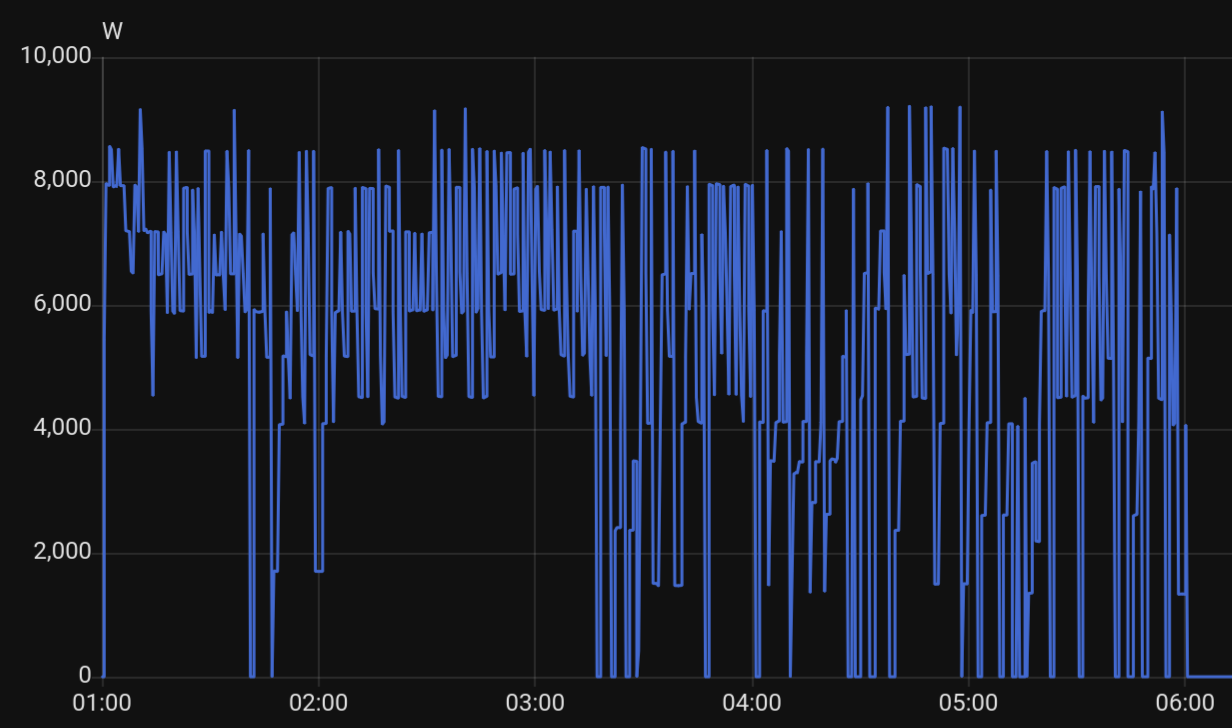
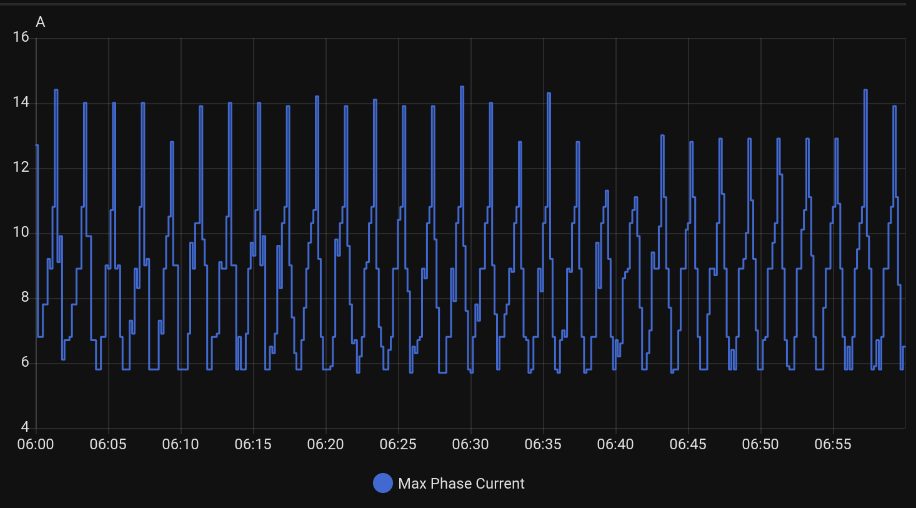
I once again awoke to a pathetic 63% charge level. In frustration, I even tried configuring it with an absurd 250A capacity, hoping to force the algorithm to “max out.” The result? It throttled down to 2kW. I cannot explain it, and neither could the manual. The logic is simply fundamentally broken; it refused to utilize the clear overhead I had purchased. See the following graph of the maximum current used on any phase during the morning when no car is charging. The spikes in the graph are the electric radiators pulsing on and off to in response to their thermostats (set at 19C). The graphs shows very short spikes to 14A - meaning there should be a full 11A safely available at all times!
The 6A Limbo
So, the load balancer was useless. I decided to bypass it entirely. My plan was to run the charger at a constant current and handle any necessary limiting via the car settings or Home Assistant.
I contacted ChargeAmps support (yet again) and managed to convince an agent to set my “offline current” to 16A (max). This theoretically allows the charger to deliver full power even if I physically disconnected the load balancer.
In practice? No change.
Despite the support agent’s efforts, the hardware logic seems to override this setting. Whenever the load balancer isn’t dictating terms, the charger defaults back to its “safety mode” of 6A.
If your internet goes down? 6A. If their server has a hiccup? 6A. If you disconnect the malfunctioning load balancer? 6A.
For now, I am forced to live with this. 6A on three phases at 400V is around 4.1kW, meaning I can recharge my daily usage in about 7 hours. It is absolutely ridiculous to be throttled like this on an 11kW capable charger, but I can still get to work and back.
The OCPP Mirage on ChargeAmps
“But wait,” I thought, “The spec sheet says it supports OCPP 1.6J.”
Open Charge Point Protocol (OCPP) is the standard that allows chargers to talk to any management system. Theoretically, I should be able to disconnect it from the ChargeAmps proprietary cloud and connect it to Home Assistant or a local OCPP server to handle the logic myself.
Determined to make this work, I tested against three different OCPP implementations:
1. lbbrhzn/ocpp: The charger indicated it was ready, initiated a transaction, but then immediately went into a SuspendedEVSE state and never actually started flowing current. Remote start commands were ignored.
2. SteVe: The exact same behavior. Handshake, transaction start, then suspension. No charging.
3. Powerfill.app: This cloud-based option couldn’t even establish a connection, possibly due to SSL implementation issues on the charger side.
The verdict? The charger connects and handshakes, but refuses to charge.
Despite the marketing claims, the OCPP implementation seems non-functional.
Conclusion: Tear It Out
I accept the principle that certified electricians should handle high-voltage installations. However, I do not accept being locked out of the software configuration for hardware I legally own.
Consider my breaker box. I am not allowed to rewire it myself, but that does not mean there is a manufacturer’s padlock on it preventing me from resetting a fuse. What happens if my preferred electrician isn’t a “ChargeAmps Partner”? I am effectively held hostage by their partner network.
I am done fighting with it. I am hiring an electrician to remove this “smart” e-waste. I plan to replace it with a charger that has smart features as an optional extra, and where WiFi is not a requirement for basic functionality.
If you value reliability and control, pick a charger that supports local networking and open protocols natively, and Avoid ChargeAmps.